A team we work with burned through all their AI credits in about three days.
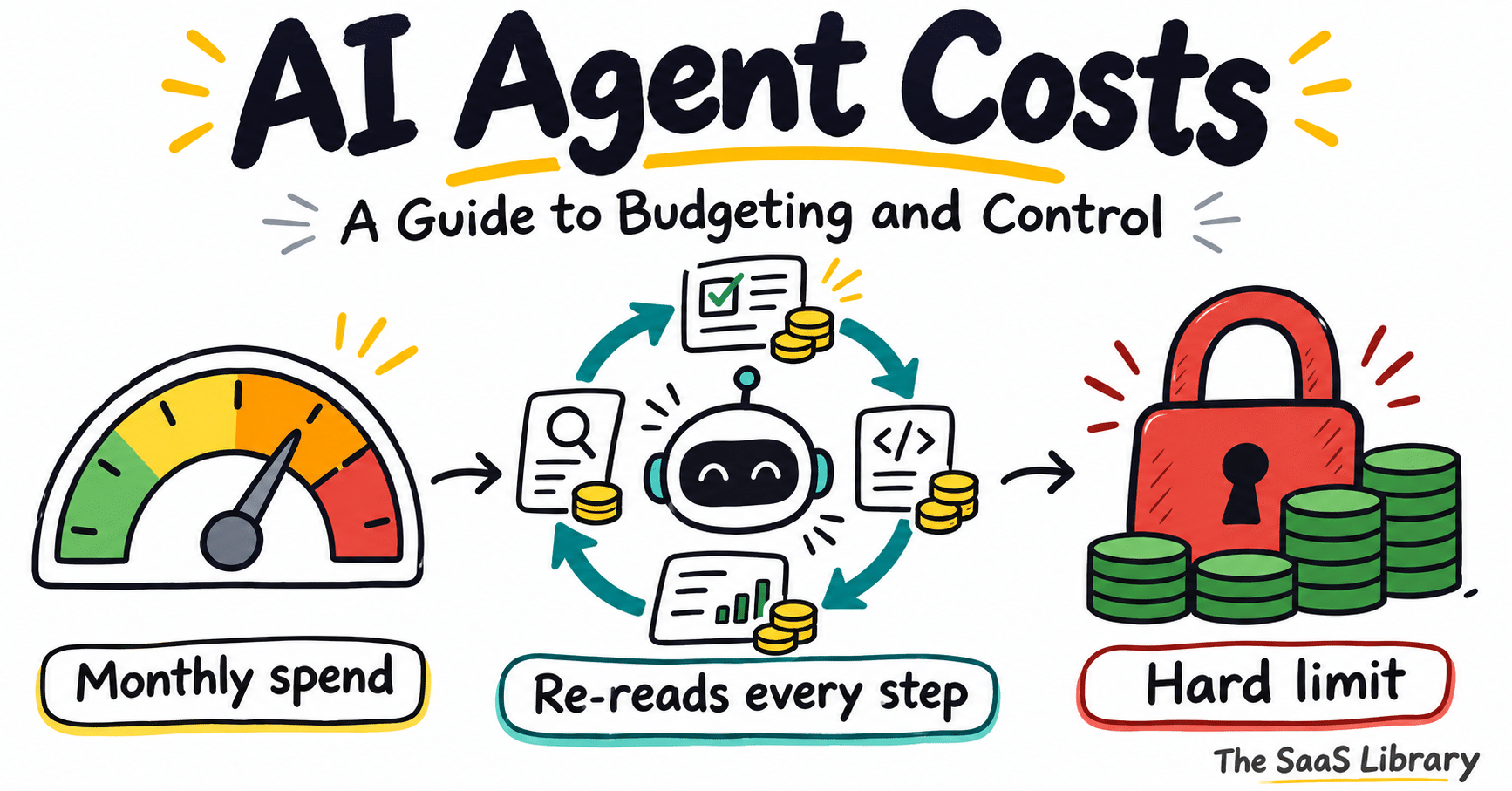
AI agent costs are the token, tool, and infrastructure charges an agent generates every time it runs. The bill depends on how many runs happen, how many steps each run takes, and how much context is re-sent at each step.
A team we work with burned through all their AI credits in about three days. We figured they’d just upgrade, until we saw what was running. Each person had set up the same helper: check my Gmail every hour and do these five things. That’s 24 runs a day per person, and every run costs money whether or not anything new showed up.
They’re not unusual. Menlo Ventures’ survey of about 400 US enterprise buyers found companies spent roughly 2.5 times what they planned on AI this year, and Menlo’s explanation is agents. They “keep going even after people step away.” CloudZero’s survey of 252 finance leaders found 61% already spend more on AI than they can justify, and only 12% can break the spend down finely enough to do anything about it within the quarter. CloudZero commissioned this survey and sells allocation software, so read its numbers with that in mind.
I lead growth at Type.com. We run agents for teams and for ourselves, so I look at a lot of agent bills. This is what I’ve learned about why they grow, where the money goes, how to budget for it, and how to keep it in check without making everyone file a ticket to use AI.
A note on the numbers: prices are list prices from each provider’s pricing page on November 6, 2026. The cost examples are models, with the assumptions written next to them. Our own numbers come from the Type.com workspace our eight-person team runs the company on. One small team is an illustration, not a benchmark, so I’ve checked ours against Menlo, Ramp and the vendors’ published data wherever I could.
Why do AI agent costs sneak up on you?
The bill sneaks up because agents run outside the normal purchase gate. Each run costs fractions of a cent, but an agent that runs hourly, around the clock, multiplies a small cost into a large monthly bill, and seat-based budgets no longer capture it.
A couple of years ago, AI spend was a seat. You bought ChatGPT for the team, it hit the card at a fixed price per person, and finance moved on. Now seats are just one part of the bill, and most budgeting processes still only know how to handle seats.
Most company spend goes through a gate. Someone asks for it and someone else approves it. AI usage skips the gate. It shows up in fractions of a cent, thousands of times a day, started by dozens of people and a growing number of machines, and no single charge is big enough to need a sign-off. It also comes in through side doors: a designer expenses an image tool, an engineer puts a coding agent on a personal card. In Zylo’s 2026 SaaS Management Index, 78% of IT leaders reported unexpected charges tied to AI features or consumption pricing.
Seats aren’t a fixed cost anymore. Most of the seats you buy now come with a meter attached. GitHub Copilot Business is still $19 a user, but since June that price includes $19 of AI credits, and anything past that is billed at model rates. Claude Enterprise is priced per seat plus usage. Cursor bills third-party models at API list price. ChatGPT Business and Enterprise can run on shared credit pools with overage once the pool runs dry. So “we pay $25 a seat” stopped being a budget a while ago. Check what each seat includes, and what happens when someone goes past it.
Cheaper tokens don’t mean a smaller bill. The price of a given level of AI keeps falling. Back in 2024, a16z estimated the cost of the same capability was dropping 10x every year. Ramp’s card data shows what happens next. Comparing the week ending October 23, 2026 with the same week a month earlier, the blended price per million tokens for OpenAI and Anthropic fell 26.8%, token volume rose 37.1%, and total token spending still went up 8.9% (Ramp AI Index). People also trade up: Menlo found frontier models’ share of enterprise AI spending rose from 35% to 63% in a year.
Agents re-read everything. A model doesn’t remember anything between calls. Every time an agent takes a step, like reading a file or calling a tool, the whole conversation so far gets sent back as input. Step 30 pays to re-read steps 1 through 29. On the runs we pay for by the token in our own workspace, we’ve sent about 13.5 billion input tokens since April and gotten back about 81 million output tokens. That’s 166 tokens read for every token written. Almost all of that input, 98.9%, was served from the provider’s cache at a fraction of the normal price, which is a big part of why the bill stays sane. Menlo sees the same thing across the market: cache reads “can make up 95% or more of an agent’s tokens.”
Background work doesn’t get tired. A person using ChatGPT gets tired and goes home. A scheduled agent runs at 3am on a Sunday with the same energy as Tuesday morning. In our workspace, the eight of us had about 20,000 agent runs in the 30 days to November 6, and 64% of them started on a schedule or a trigger. Automated runs also grew faster than the ones people started by hand: up 67% on the previous 30 days, versus 49%. We build this stuff, so our mix is probably ahead of most companies. The direction is the thing to watch.
The price can change under you. In mid-2025 Cursor changed how it priced usage, then offered to refund unexpected charges from the three weeks that followed. A month later Anthropic added weekly limits to its Pro and Max plans, aimed at people running Claude Code “continuously in the background, 24/7.” This June, GitHub moved Copilot to usage-based billing and explained why: “a quick chat question and a multi-hour autonomous coding session can cost the user the same amount.” Promotional prices end, too. Google’s Gemini 4 Argon doubles in price on December 1, and Gemini 3.8 Flash doubles on January 1. Anthropic’s newer models use a tokenizer that produces about 30% more tokens for the same text, so the same prompt can cost more even when the per-token price hasn’t moved.
The budget side of this, including how FinOps teams report AI spend, is covered in our guide to AI FinOps.
Read What Is AI FinOps? →Where do AI agent costs actually go?
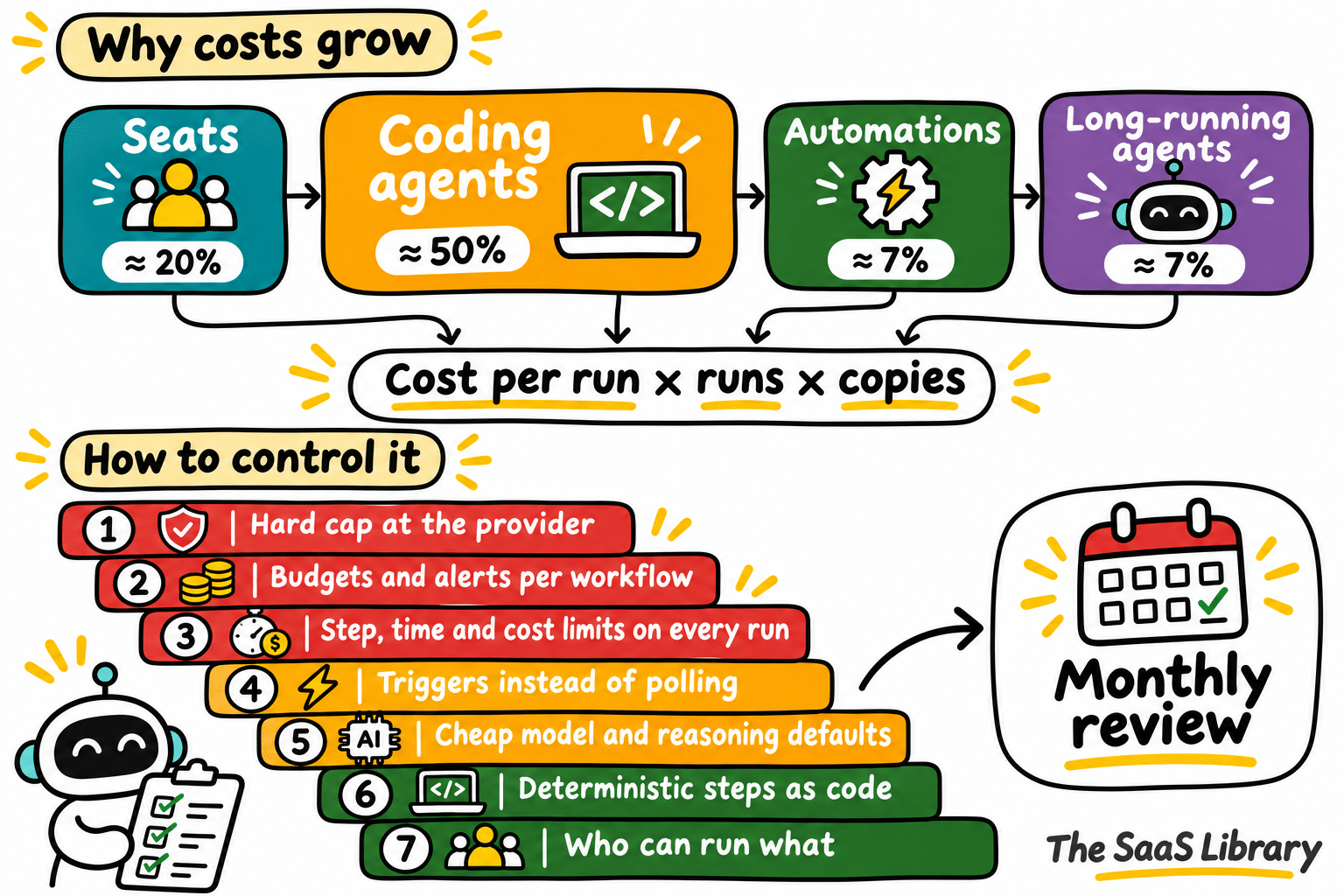
The money goes to four places: chat seats, coding agents, automations, and long-running agents. Chat is the cheapest. Coding agents are where usage-based spend usually starts. Automations multiply cost per run by runs and copies, and long-running agents grow faster than their step count.
It helps to split AI spend into four buckets, because they behave so differently: chat, coding agents, automations, and long-running agents.
Is chat the cheap part?
It’s limited by how fast people can type and read, and on a seat plan the vendor absorbs the difference between light and heavy users. Business seats run $20 to $30 a person a month at OpenAI, Anthropic and Microsoft. The waste here is seats nobody uses. Pull last-active dates from each admin console once a month and take back the idle ones. For a fuller seat audit, see How to Audit Your SaaS Stack for Shadow AI.
Where does usage-based spend start?
Anthropic’s docs say that across enterprise deployments, Claude Code averages about $13 per developer per active day and $150 to $250 per developer per month, with 90% of users under $30 per active day. In August 2025 the same page said $6 a day. OpenAI puts Codex at about $100 to $200 per developer per month. The tail is long. OpenAI says its median researcher was using more than $600 a day of inference at API prices by mid-August. Your engineers aren’t OpenAI researchers, but neither are Uber’s, and Uber reportedly blew through its 2026 AI budget in about four months. In June, Bloomberg reported it now caps every employee at $1,500 a month in token spending per coding tool.
What does an automation actually cost?
Monthly cost is cost per run, times runs per month, times the number of copies. If ten people each set up their own version of the same automation, you pay for ten. Nobody does this math upfront.
Take the hourly Gmail agent from the top of this piece, for a 10-person team. Assume each run takes 6 steps, starts with about 15,000 tokens of instructions, tool definitions and email, adds about 2,500 tokens per step, writes about 600 tokens per step, and has prompt caching on. At Anthropic’s current list prices, here’s the monthly bill depending on how often it runs and which model runs it.
Same inbox agent, about 800x spread in monthly cost
| Top tier (Fable 5.2) | Mid tier (Sonnet 5.5) | Small (Haiku 5.5) | |
|---|---|---|---|
| Every hour, around the clock (7,200 runs) | $3,161 | $826 | $45 |
| Every hour, 9 to 5 weekdays (1,760 runs) | $773 | $202 | $11 |
| Only when a customer emails (660 runs) | $290 | $76 | $4 |
Monthly cost of one inbox agent for a 10-person team, by run frequency and model. Source: author’s cost model at Anthropic list prices, prompt caching on. 6 steps per run, 15K starting tokens, +2.5K input and 600 output per step. Prices as of 12 Nov 2026.
The inbox is the same in every cell. Frequency alone moves the bill by about 10x, and the model choice by another 80x. The small model won’t be good enough for every job, but plenty of inbox triage doesn’t need the smartest model on the market, and nobody asks the question until the bill shows up.
Two kinds of automation deserve a special mention. Proactive agents watch a channel and jump in when they think they can help. A founder we know runs a construction software company that pays around $1,500 a month for one of these, and his complaint was that it jumps into Slack threads nobody tagged it in. His takeaway was that proactive agents mostly waste tokens. Every unprompted reply costs money whether it helps or not, and most of them don’t. Then there are zombies: automations that keep running and billing after everyone has forgotten about them. Some are old experiments. Some are duplicates, because when every tool ships its own agent builder, the same weekly summary gets built in ChatGPT, in Claude and in an automation tool, and only one of them gets read. Even tools you’d expect to sit quietly can keep spending. Anthropic’s docs point out that a scheduled task in Claude Code “fires on its interval even while the session is idle, sending your full context each time.”
Why do long-running agents cost more than expected?
Because every step re-sends the whole conversation, doubling the length of a run more than doubles the cost. Say an agent starts with 20,000 tokens of context, adds about 3,000 tokens per step, and writes about 800 of those. On Claude Opus 5.5 at list prices, a 50-step run costs $19.50 without caching and 100 steps costs $69. With caching it’s $2.54 and $6.49. Caching saves more than anything else here, but even with it on, cost grows faster than the step count.
A few things make that curve steeper. Tool definitions get sent on every call whether the agent uses them or not; Anthropic found that 58 tools across five common MCP servers take up about 55,000 tokens before the conversation even starts. Reasoning gets billed as output, the most expensive kind of token, whether or not you see it, and OpenAI’s docs warn a request can hit its output limit “before any visible output tokens are produced”. Some models charge more once a prompt gets long: Anthropic’s Haiku 5.5 goes from $0.10 to $0.50 per million input tokens past 100,000 tokens, and the higher price applies to the whole request. And subagents multiply all of it. An agent that spins up five helpers is paying for six contexts.
Are tokens the whole bill?
Agents that do real work also rack up tool fees (Anthropic charges $10 per 1,000 web searches, on top of the tokens the results add), sandbox and browser time, embeddings and vector storage, gateway and observability tools, and failed or cancelled runs, which cost the same as good ones. About 1% of our runs fail and another 1% get cancelled partway through. Then there’s human review time, which can easily cost more than the tokens and almost never makes it into the spreadsheet.
The spread between models matters more than any single price. On OpenAI’s lineup, the gap between the top and bottom tier is 100x; on Anthropic’s, it is 80x. Cached input costs 2.5% to 10% of fresh input.
How do you build an AI agent budget?
Build the budget from four lists, then price each bucket: seats are people times plan price, coding agents start from about $100 to $250 per developer per month, and automations are cost per run times runs per month. Budget long-running agents as a range, and add a 25% buffer on usage.
AI spend behaves more like your cloud bill than your software bill. Software is seats times price. Cloud is usage, so you forecast it, set limits and review it every month. The FinOps Foundation’s guidance for AI says to allocate first, then right-size models, then use tokens efficiently, and only commit to volume once usage is stable. Its line on unit economics is the one I’d tape to the wall: “Measure the use case, not the token.” Gartner expects more than 40% of agentic AI projects to be canceled by the end of 2027, and escalating costs are the first reason on its list.
Start with four lists. If you can’t fill them in on the first try, that’s your first finding.
- Seats: every AI subscription, who has it and when they last used it
- API accounts and keys: every provider account, who owns each key and what it’s for
- Automations: every scheduled or triggered agent, its owner, how often it runs and which model it uses
- Expensed tools: 90 days of card and expense data, searched for AI vendors
Then put a number on each bucket. Seats are people times plan price. Coding agents start from the benchmarks above, roughly $100 to $250 per developer per month, adjusted for your heaviest users. Automations are cost per run times runs per month, with cost per run taken from a week of real usage. Long-running agents are cost per task times tasks per month, and they vary the most, so budget a range. Before you commit to an agent, estimate its cost with What Does Agentic AI Actually Cost?
Here’s what that looks like for a 50-person software company with 12 engineers, a support team with an agent on its inbox, and about ten automations across sales, marketing and ops.
| Line | Assumption | Monthly cost |
|---|---|---|
| Chat seats | 50 people on a business plan at $20 per seat | $1,000 |
| Coding agents | 12 engineers at $150 to $250 each, Anthropic’s enterprise average for Claude Code | $1,800 to $3,000 |
| Support inbox agent | Runs on each new ticket, about 900 a month, on a mid-tier model at about $0.11 a run | About $100 |
| Sales, marketing and ops automations | About 10 automations and 2,000 runs a month on a mid-tier model at about $0.11 a run | About $230 |
| Long-running research and analysis agents | 80 tasks a month on Opus 5.5 at $2.50 to $6.50 each (50 to 100 steps, cached) | $200 to $520 |
| Tool fees | 3,000 web searches at $10 per 1,000, plus some sandbox time | About $50 |
| Growth buffer | 25% on everything usage-based | $600 to $980 |
| Total | About $3,980 to $5,880 |
Author’s cost model using Anthropic and OpenAI list prices and Claude Code cost docs, November 2026.
That’s roughly $80 to $120 per employee per month. Seats, the part most companies think of as their AI budget, are only a sixth to a quarter of it. The usage lines are the ones that can double in a quarter without anyone deciding they should. Our own total agent runs went up 59% from one 30-day period to the next, so set a growth assumption and revisit it every month rather than picking an annual number and hoping.
Split the budget by team and by workflow. A company-wide number tells you when you’re over, but not why. And for each major workflow, track a cost per outcome: per support ticket resolved, per pull request merged, per lead researched, per report delivered. Compare it to what that outcome is worth, or to what it cost when a person did it. That number is how you defend the budget and how you decide what to cut.
For scale, Ramp’s card data for September 2026 puts the median company paying for AI at $15.70 per employee per month, the top 10% of companies at $813, and the top 1% at $9,568. A company where people actually use agents lands well above the median.
Want to test your own agent before you commit to a budget? Use the calculator below to price one run, one month, or a whole team.
Open the cost calculator →How do you control AI spend without slowing people down?
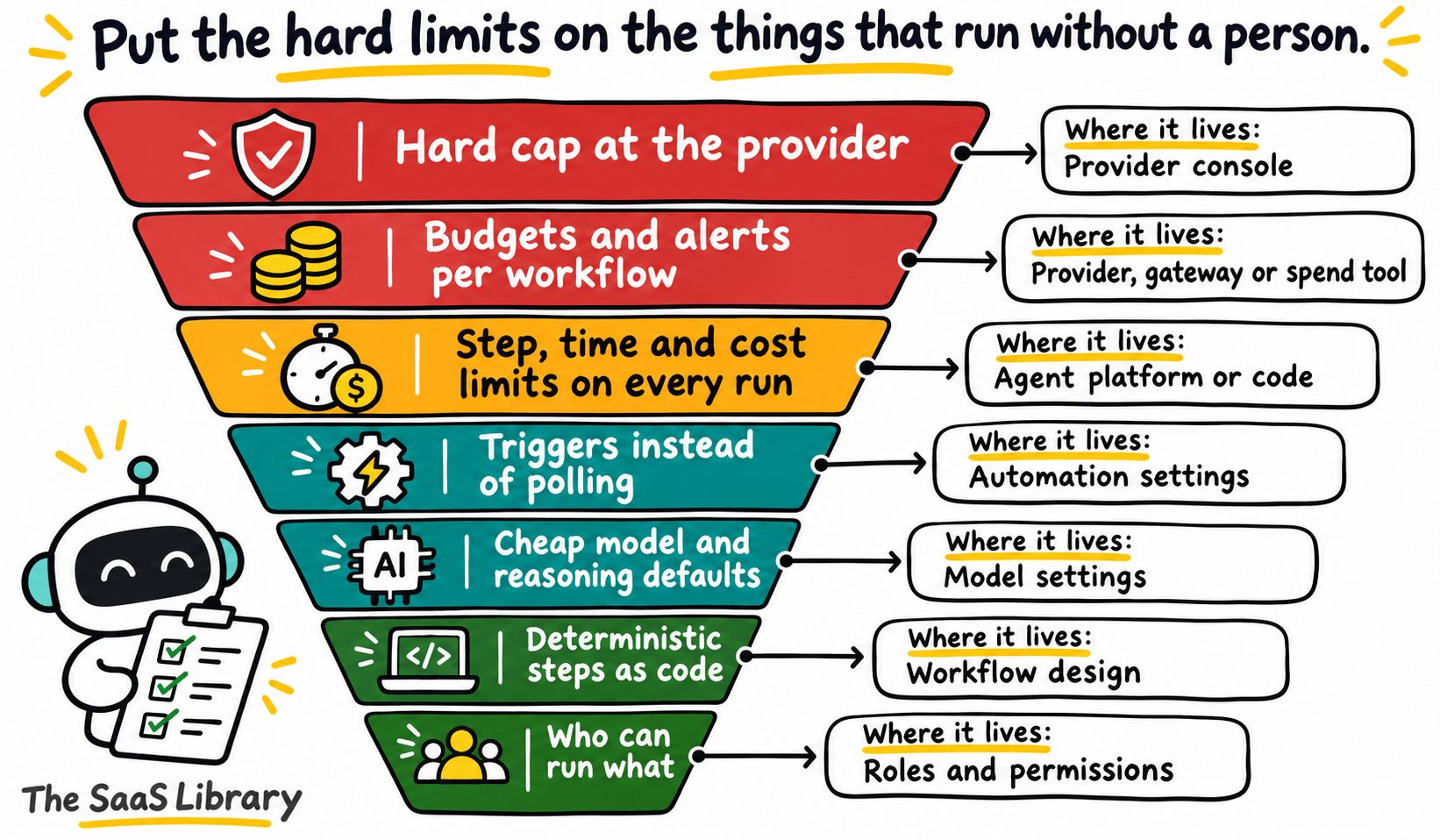
Put limits on machines, not people. Let anyone ask AI anything, and put hard limits on the things that run without a human, using seven controls from the broadest, a provider hard cap, to the narrowest, who can run what.
The simplest way to control AI spend is to give everyone a usage limit. Plenty of companies do exactly that. A friend of ours at a well-known software company says that’s their whole system: everyone gets a limit, and they trust each person to optimize inside it. It guarantees a ceiling, which finance likes, but it doesn’t tell you where the money goes. You can stay under a $5,000 monthly cap and still be spending $3,000 of it on an agent that checks email.
My rule: put limits on machines, not people. Let anyone ask AI anything, and put the hard limits on the things that can run without a human. Seven controls, broadest first.
What hard cap should you set at the provider?
Set a monthly cap on each provider account that actually stops spend, sized well above normal usage. It’s there for the 3am loop. The real budgeting happens one layer down. Check what your current settings actually do, because the defaults are looser than most people assume. OpenAI’s hard limits exist but enforcement “is not instantaneous.” Claude Enterprise’s guide says “No limit anywhere = no limit,” and Claude Tag (Claude in Slack, beta) bills channel work to the organization, so per-user limits don’t cap it. ChatGPT Enterprise alerts “do not stop usage.” Azure budgets only alert: “your consumption isn’t stopped.”
| Vendor | Does the limit stop spend? | What the vendor documents |
|---|---|---|
| OpenAI API | Hard cap | Spend limits on the org and each project. Enforcement “is not instantaneous.” |
| Anthropic API | Hard cap | Org and workspace spend limits, set in the Console. Requests are blocked once a limit is reached. |
| Claude Enterprise | Hard cap | Org, group and user limits. “No limit anywhere = no limit.” Claude Tag (Claude in Slack, beta) bills to the organization, so per-user limits don’t cap it. |
| ChatGPT Enterprise | Hard cap | Monthly workspace budget. Without one, no cap. Usage alerts “do not stop usage.” |
| Gemini API | Hard cap | Project spend caps. Agent sessions and batch jobs can run past them. |
| GitHub Copilot | Hard cap | Turn off overage and Copilot pauses until the next cycle. |
| Azure | Alerts only | Budgets only alert: “your consumption isn’t stopped.” Quotas limit throughput, not dollars. |
Source: each vendor’s documentation, accessed November 2026.
Who should get alerts for each workflow?
Send alerts at 50%, 80% and 100% of each monthly budget to whoever owns that workflow. Make the owner a specific person. The Tokenomics Foundation’s State of Tokenomics survey found that organizations with a named owner for AI spend were 3.7 times more likely to show value to the CFO. For people, use soft limits by role with a same-day way to get more. Uber went further with a hard $1,500 per person per tool. If you do that, make asking for more fast, or your best people will route around the system.
How do you stop a run that goes wrong?
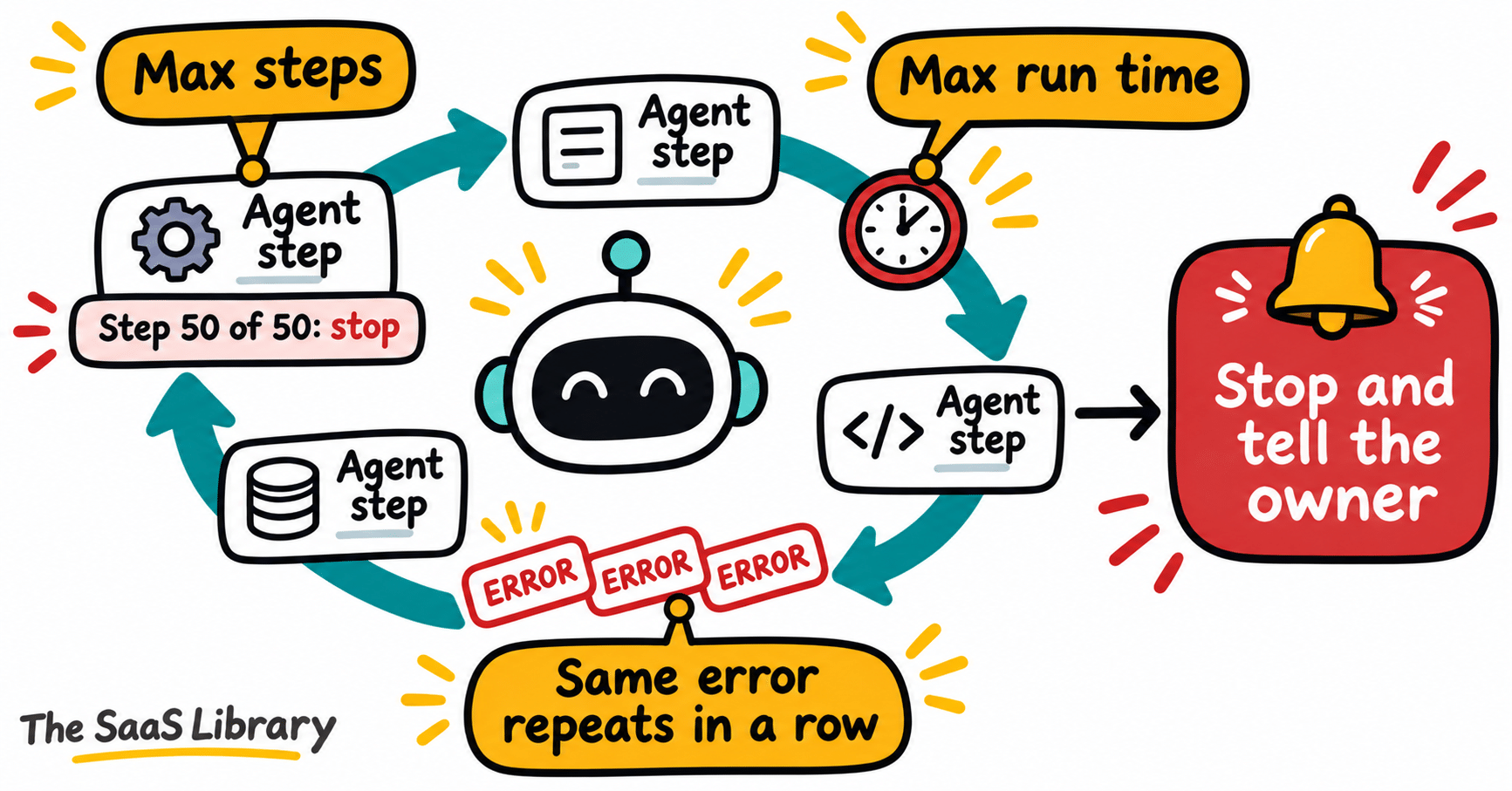
Every automation and long-running agent should have a maximum number of steps, a maximum run time and, ideally, a maximum cost per run. When it hits a limit, it stops and tells someone. Add one more rule people forget: stop when the same error repeats in a row. For why agents fail in production, see Why Do AI Agents Fail?
When should an automation run?
“Check my inbox every hour” is polling. “Run when a customer emails” is a trigger. Triggers only do work when there’s work to do. Make anything that runs more often than daily justify itself, and give automations an expiration date so forgotten ones turn themselves off. Agents that spend on their own also raise a separate question, covered in Do AI Agents Need a Software License?
Which model should an automation default to?
Default every automation to a small or mid-tier model and a low or medium reasoning level, and move up only when the cheap setup fails a real test. A couple of our ecommerce customers run nearly everything on a mid-tier model because it’s cheap and good enough. I mostly ballpark the reasoning level on my own automations, and when it came up on our team, nobody really knew the right setting either. The instinct is “this one’s important, so use high,” and that gets expensive across a few hundred runs a day. Test one level down and see if anything breaks.
Which steps should be code instead of a model?
If a step doesn’t need judgment, it shouldn’t be a model call. Formatting a report, moving data between systems, filtering rows, checking a date: code does all of that for basically free, the same way every time. Let an agent figure out a workflow for the first few runs, then turn the predictable parts into code and keep the model for the parts that need thinking.
Who can run which agents?
Not everyone needs the same permissions. A simple version: everyone can chat, run one-off tasks and set up personal automations that run daily or less; people who own team workflows can set up shared automations and triggers within their team’s budget; team leads, ops or IT approve long-running agents, bigger budgets, new providers and anything hourly or more often. For the governance gap behind this, see 96% of Companies Are Running AI Agents. Only 21% Can Control Them.
How do you see AI spend by person, team, and workflow?
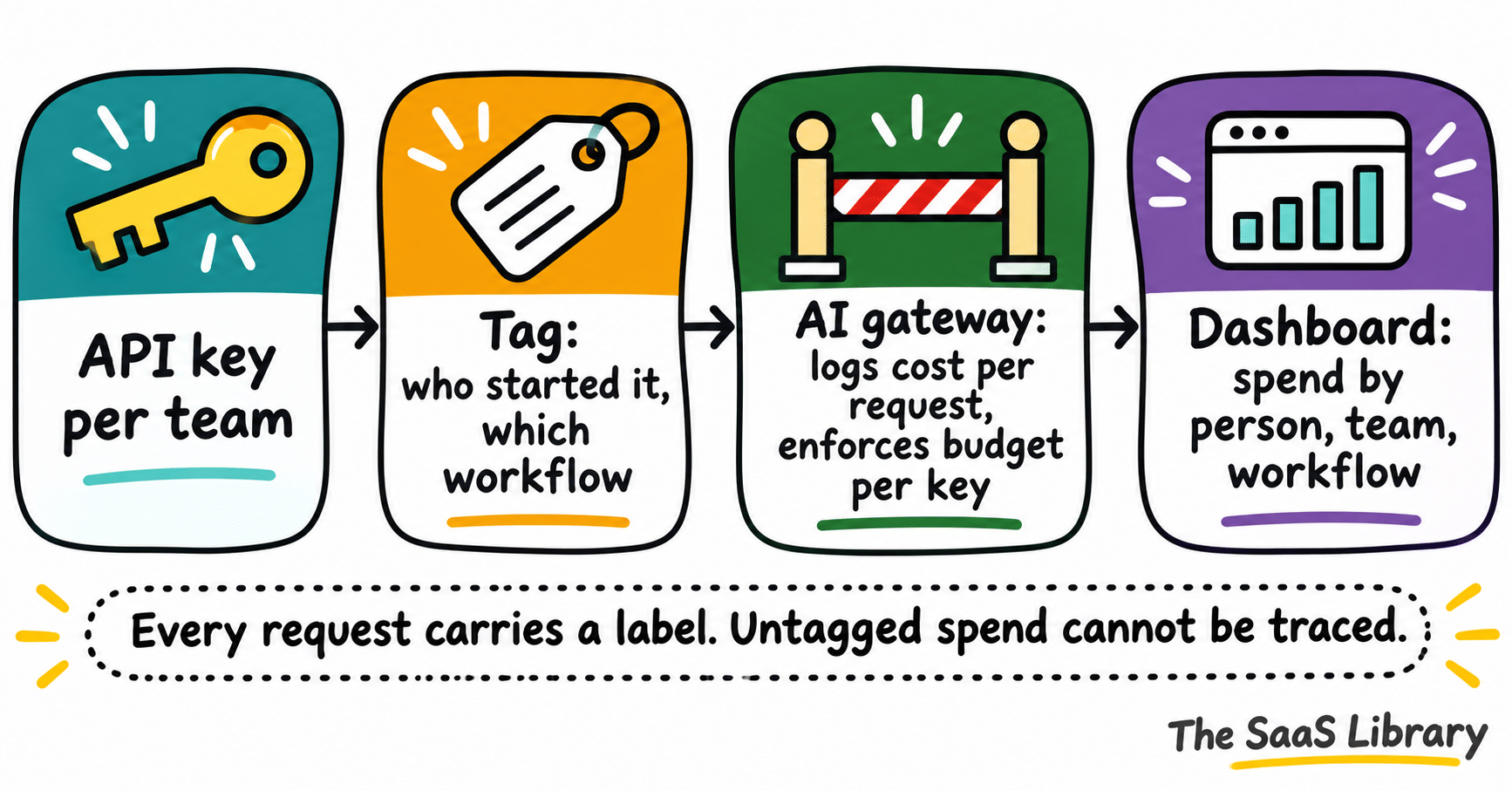
You see AI spend by person, team, and workflow when every request carries a label. Use separate keys or projects per team, tag each request with who started it and which workflow it belongs to, route traffic through a gateway that logs cost per request, and pull provider exports into one place.
Fletcher, one of our cofounders, recently talked to someone in FP&A at a software company with about 400 people. Fletcher’s guess is they spend around a million dollars a year on Claude. Their whole cost control process: each month, find whoever spent the most and ask, “Why did you spend $20,000 on Claude last month?” The person walks them through it, and that’s the end of it. Then they do the same with the next big spender.
My first thought was that the smart move at that company is to be the second-biggest spender. It’s a common place to start, and it has two problems. It only looks at people, and it only looks at the top. The person who spent $20,000 might be the most productive person in the building. Meanwhile 40 automations quietly spending a few hundred dollars each never get a single question.
The better question is whether a workflow is worth what it costs, and you can only answer it if every request carries a label for the workflow it belongs to. Easiest first: separate keys or projects per team and per major workflow, which the FinOps Foundation describes as mapping “each API key to one team, application, and cost center”; tagging every request with who started it and which workflow it belongs to; routing traffic through an AI gateway like LiteLLM, Portkey, Helicone, OpenRouter or Cloudflare’s that logs cost per request and enforces budgets per key; and pulling provider cost exports into the same place as the rest of your spend.
The numbers worth watching are spend by bucket, cost per run and runs per month for each automation, cost per outcome for your top workflows, the share of runs started by people versus schedules, automations with no owner or whose output nobody has opened in 30 days, failure and retry rates, and seats with no activity in 30 days.
Show teams their own numbers before you ever charge them back. Once a team sees that its daily digest costs $400 a month, someone asks whether it needs to be daily. Be careful with company-wide leaderboards of individual spend, though. They punish your best users, and not every company wants every employee looking at the total AI bill. Team-level numbers for everyone and individual numbers for managers is a reasonable default.
A few traps when you measure. The one that got us was cumulative usage: this summer we followed an SDK’s docs for reading token usage, the docs were wrong, and for a while our cost tracking counted cumulative tokens instead of per-turn tokens, so every long run looked far more expensive than it was. Check your numbers against the invoice. Cached tokens trip people up in both directions, because counting them at full price overstates your costs and leaving them out hides most of your volume. Credits hide the real cost, so track list price before credits. And most provider dashboards report in UTC, so their month won’t line up exactly with yours.
What should a monthly AI cost review include?
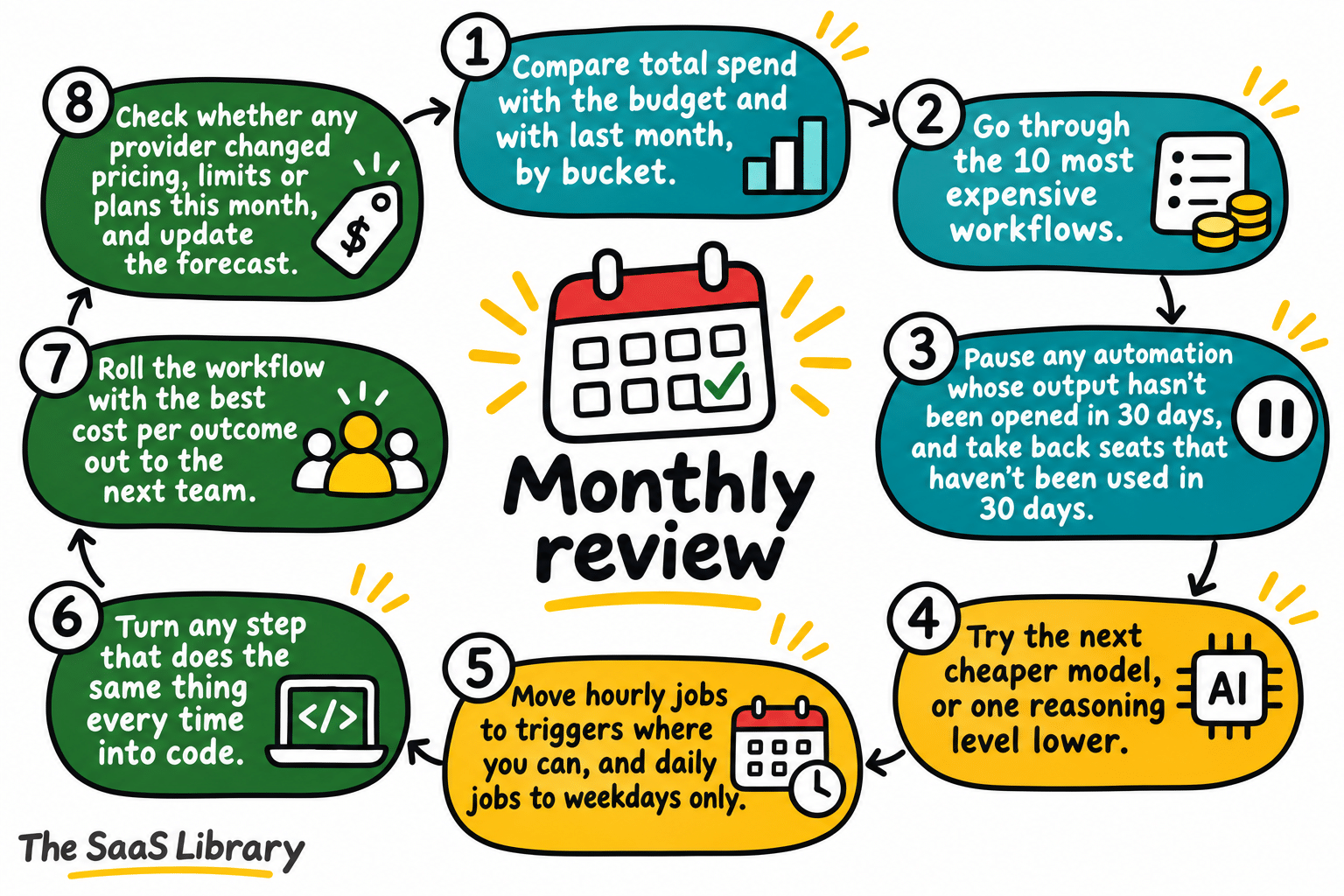
A monthly AI cost review compares spend with the budget, reviews the ten most expensive workflows, pauses idle automations and seats, tests cheaper models, moves hourly jobs to triggers, turns repeated steps into code, and checks provider pricing changes. It takes under an hour.
Controls only work if somebody looks at the numbers on a schedule. Start with a monthly review that takes under an hour, run by whoever owns the AI budget, with one person from each team that spends a lot.
- Compare total spend with the budget and with last month, by bucket. Flag anything that moved more than 20%.
- Go through the 10 most expensive workflows. For each one, note what it produced and its cost per outcome, then keep, fix or kill it.
- Pause any automation whose output hasn’t been opened in 30 days, and take back seats that haven’t been used in 30 days.
- Try the next cheaper model, or one reasoning level lower, on the three most expensive workflows for a week. Keep the change if quality holds.
- Move hourly jobs to triggers where you can, and daily jobs to weekdays only.
- Turn any step that does the same thing every time into code.
- Roll the workflow with the best cost per outcome out to the next team.
- Check whether any provider changed pricing, limits or plans this month, and update the forecast.
Write the decisions down somewhere simple. Example numbers:
| Workflow | Monthly cost | What it produced | Decision |
|---|---|---|---|
| Daily pipeline digest | $41 | 22 digests, read by 6 people | Keep, test a smaller model |
| Inbox triage, 10 people, hourly around the clock | $826 (Sonnet 5.5, 7,200 runs) | Output not measured | Switch to a trigger: customer-email-only runs cost $76 on the same model |
| Competitor monitor | $165 | Nobody opened it in 30 days | Kill |
Illustrative example numbers.
Where should you start with AI agent costs?
Start by listing every automation that runs on a schedule, with its owner, how often it runs and which model it uses. Then fix the ones that run too often or that nobody reads, put a step limit and a cost limit on every run, and put the first monthly review on the calendar.
If you only do one thing this month, list every automation that runs on a schedule, with its owner, how often it runs and which model it uses. Odds are you’ll find something running far more often than it needs to, and something nobody has read in weeks. Fix those, put a step limit and a cost limit on every run, and put the first monthly review on the calendar.
If you’re still deciding whether to build an agent yourself or buy one, the 2026 data is in Build vs. Buy an AI Agent: What the 2026 Data Actually Says. For your first workflow, see How to Pick Your First AI Agent Workflow.
AI Agent Cost Calculator
Change any input and the chart updates straight away. Add up to five runs to compare them on one chart.
How to use this calculator
- Load an example or enter your own run. Choose a model, turn caching on or off, set the steps, then fill in the token inputs.
- Read the chart and results. They update as you change any input.
- Press Add to chart to keep the run on the chart. Each saved run gets its own colour and dash pattern.
- Change one input and add again to compare. Up to five runs fit on one chart, and Remove takes a run off.
Prices are Anthropic list prices as of 12 Nov 2026, with cache writes at the five-minute rate. Above 100,000 tokens of context, Haiku’s rates rise five times; the calculator flags this but does not model it. Tool fees, failed runs and human review are not included.
Frequently Asked Questions
What are AI agent costs?
AI agent costs are the token, tool, and infrastructure charges an agent generates every time it runs. Tokens are the main line, because every step re-sends the conversation.
Why does an AI agent cost more over time?
An AI agent costs more over time because every step re-sends the whole conversation. Doubling a run’s length more than doubles its cost, and tool definitions are sent on every call.
How much does prompt caching save?
Prompt caching cuts the repeated part of the cost sharply. In the article’s 100-step Opus example, the cost falls from $69.00 to $6.49 with caching on. The saving depends on the model’s cache-read price.
Which AI agent controls should I set first?
Set a hard cap at the provider first, because it stops a runaway month. Then add budgets and alerts per workflow, and step, time and cost limits on every run.
What is a monthly AI cost review?
A monthly AI cost review is a short check of spend against budget, run by the person who owns the AI budget. It covers the ten most expensive workflows, idle automations and seats, cheaper-model tests, and provider pricing changes, and it should take under an hour.
Do seats or usage cost more?
For most teams in the article’s example, usage costs more than seats. Seats are about a sixth to a quarter of a 50-person company’s AI budget, and coding agents, automations and long-running agents make up the rest.
How do I budget for AI agents?
Budget AI agents from four lists: every subscription, every API account and key, every automation, and every expensed tool. Price each bucket, then add a 25% buffer on usage.
Why do AI agent costs surprise finance teams?
AI spend skips the usual purchase gate. It arrives in fractions of a cent, thousands of times a day, from people and machines nobody budgets for, so finance sees the total only after the bill arrives.
Conclusion
The seven controls on this page cap what an AI agent is allowed to spend, which keeps AI agent costs predictable. Start with the provider’s hard cap, add budgets and step limits, and keep a monthly review on the calendar. The inbox agent in the example shows why: at the same hourly, around-the-clock frequency, it costs $45 a month on a small model and $3,161 on a top-tier one. Use the calculator above to test your own agent before you commit to one.
- Menlo Ventures, 2026: The State of Enterprise AI (Nov 3, 2026)
- CloudZero, Why Finance Caps What It Can’t See, FY2027 survey of 252 finance leaders (2026)
- Ramp AI Index (data through October 2026)
- Zylo, 2026 SaaS Management Index
- Anthropic, Claude Code: manage costs effectively
- Anthropic, Claude API pricing (accessed Nov 2026)
- OpenAI, API pricing
- OpenAI, API spend limits
- Google, Gemini API pricing
- GitHub, GitHub Copilot is moving to usage-based billing (Apr 27, 2026)
- Anthropic, Claude Enterprise consumption guide
- OpenAI, Research acceleration: The view inside OpenAI (Sep 6, 2026)
- Bloomberg, Uber caps usage of AI tools like Claude Code (June 2, 2026), via Simon Willison’s weblog
- Gartner, Over 40% of agentic AI projects will be canceled by end of 2027 (June 25, 2025)
- FinOps Foundation, FinOps for AI Overview (updated Oct 28, 2026)
- Tokenomics Foundation, State of Tokenomics (Sept 2026)
- Anthropic Engineering, Introducing advanced tool use (Nov 24, 2025)
- Microsoft Learn, Create and manage Azure budgets
- Type.com workspace analytics, April 29 to November 6, 2026 (first-party, Type.com team workspace)