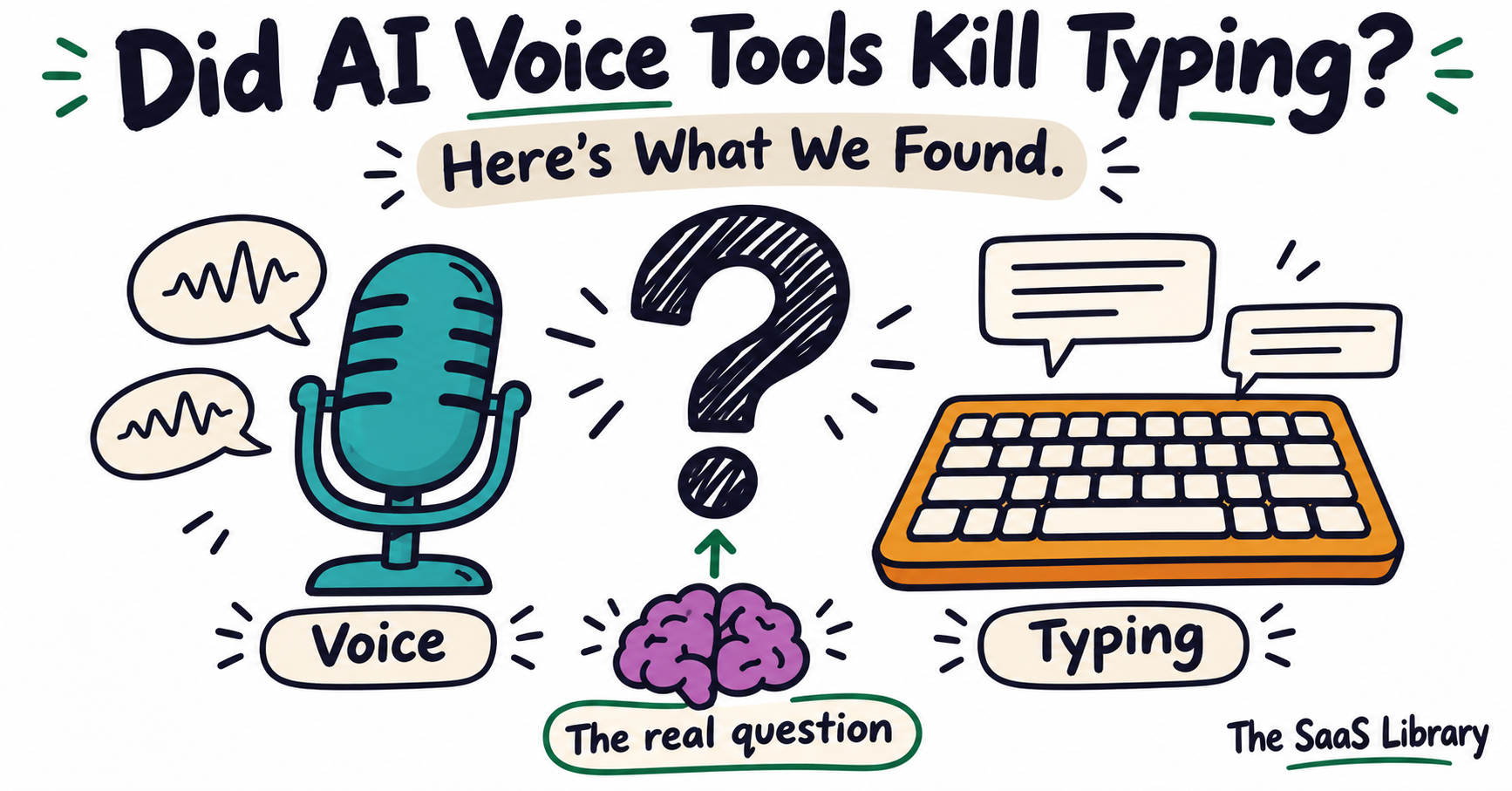
AI voice dictation tools raised $361 million in funding in 2026. Offices started sounding like call centres. And somewhere in the middle of all that noise, millions of people quietly asked: is typing going away? No. But that’s the wrong question.
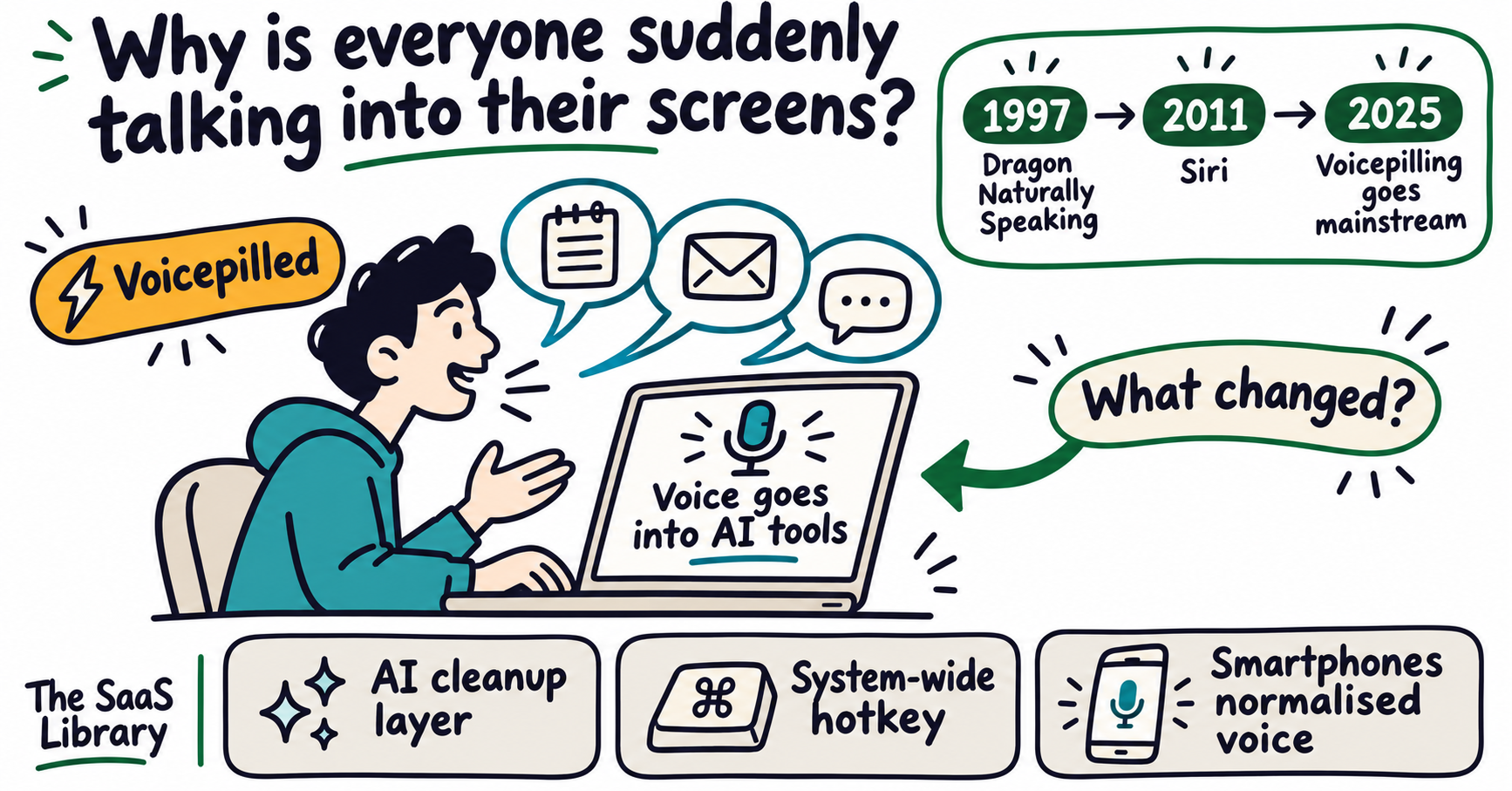
Why is everyone suddenly talking into their screens?
In autumn 2025, LinkedIn co-founder Reid Hoffman publicly declared he was “voicepilled” — the moment you realise speaking to technology is faster and more productive than typing. The term spread through tech circles, mainstream press picked it up, and a cultural shift that had been building for years became a named phenomenon overnight.
The word “voicepilled” borrows from The Matrix. The idea is a moment of sudden clarity: once you start using your voice to interact with technology, you can’t go back to the keyboard. Hoffman wasn’t just making a productivity claim — he was describing a cognitive shift that the keyboard, a tool inherited from the Victorian-era typewriter, is an artificial constraint on how fast and freely humans can think and communicate with machines.
Three things had aligned by autumn 2025 to make the moment possible:
- AI-powered transcription had finally become reliable. Unlike Dragon NaturallySpeaking in the 1990s or early Siri, modern AI voice tools don’t just transcribe — they interpret. Filler words are removed. Sentence structure is cleaned. The text that lands in your document or prompt reads like you wrote it, not like you spoke it.
- The tools had gone system-wide. You no longer needed a dedicated dictation app. Modern AI voice tools sit as a hotkey layer across your entire operating system — press a shortcut, speak, and the text appears in whatever field is active, whether that’s Gmail, ChatGPT, Slack, or a code editor.
- Smartphones had already normalised voice input. A decade of Siri, Google Assistant, and voice search had primed hundreds of millions of people to speak to their devices. AI dictation tools stepped into an already-open door.
The press followed quickly. The Guardian ran “The end of typing? Why workers are suddenly ditching their keyboards” in May 2026. Computerworld declared typing “out” and talking “in.” Wispr Flow was downloaded 2.5 million times globally between October 2025 and April 2026, according to Sensor Tower data reported by TechCrunch. India became its second-largest market. By mid-2026 the company had raised $361 million at a $2 billion valuation (Reuters, 2026).
Being voicepilled is the moment when you feel the effortlessness and delight that comes from talking instead of typing.
But downloads aren’t daily usage. And a $2 billion valuation reflects investor expectations, not how many people are actually typing less. The trend is real. The scale of the shift is not yet clear. That distinction matters for everything that follows.
What are AI voice dictation tools and how do they actually work?
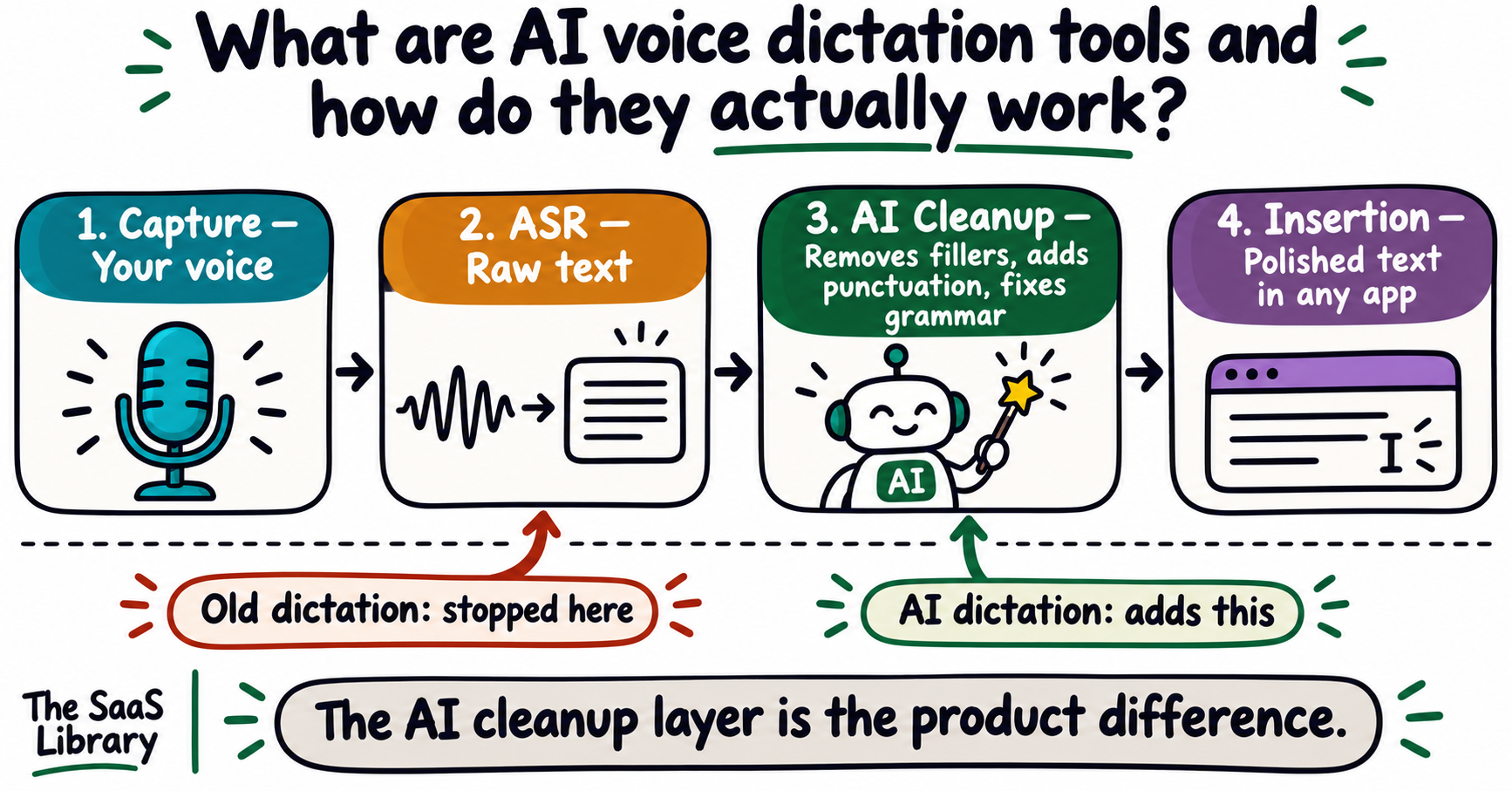
AI voice dictation tools convert spoken words into polished, ready-to-use text using a two-stage process: an ASR engine transcribes speech into raw words, then an AI cleanup layer removes filler words, adds punctuation, corrects grammar, and formats the output. The finished text is inserted directly into whichever application has your cursor.
Dragon NaturallySpeaking launched in June 1997 as the first continuous-speech dictation product — meaning you could speak at conversational speed without pausing. But it required hours of voice training and still produced raw text you had to edit yourself. What changed in 2024–2026 is stage 3: the AI cleanup layer.
| Stage | What happens | What’s new vs. old dictation |
|---|---|---|
| 1. Capture | Microphone captures audio | Same as always |
| 2. ASR | Speech recognition converts audio to raw words | Faster, more accurate, accent-aware |
| 3. AI Cleanup | LLM removes fillers, adds punctuation, corrects grammar | This is the new part — old tools stopped at stage 2 |
| 4. Insertion | Polished text drops into the active cursor field | System-wide, any app |
Built-in options — Apple Dictation, Windows Speech Recognition, Gboard — stop at stage 2. They output raw text: lowercase, no punctuation, every filler intact. AI dictation tools add stage 3 on top. That is the product difference users are paying for.
Voice data processed by cloud-based tools travels to external servers. For sensitive business information, consider on-device models. See our guide on what happens to your data when you use a free AI tool.
To understand how AI dictation tools fit in the broader landscape of AI products, see our breakdown of the difference between an AI agent and a chatbot.
Has technology ever actually killed a skill before?
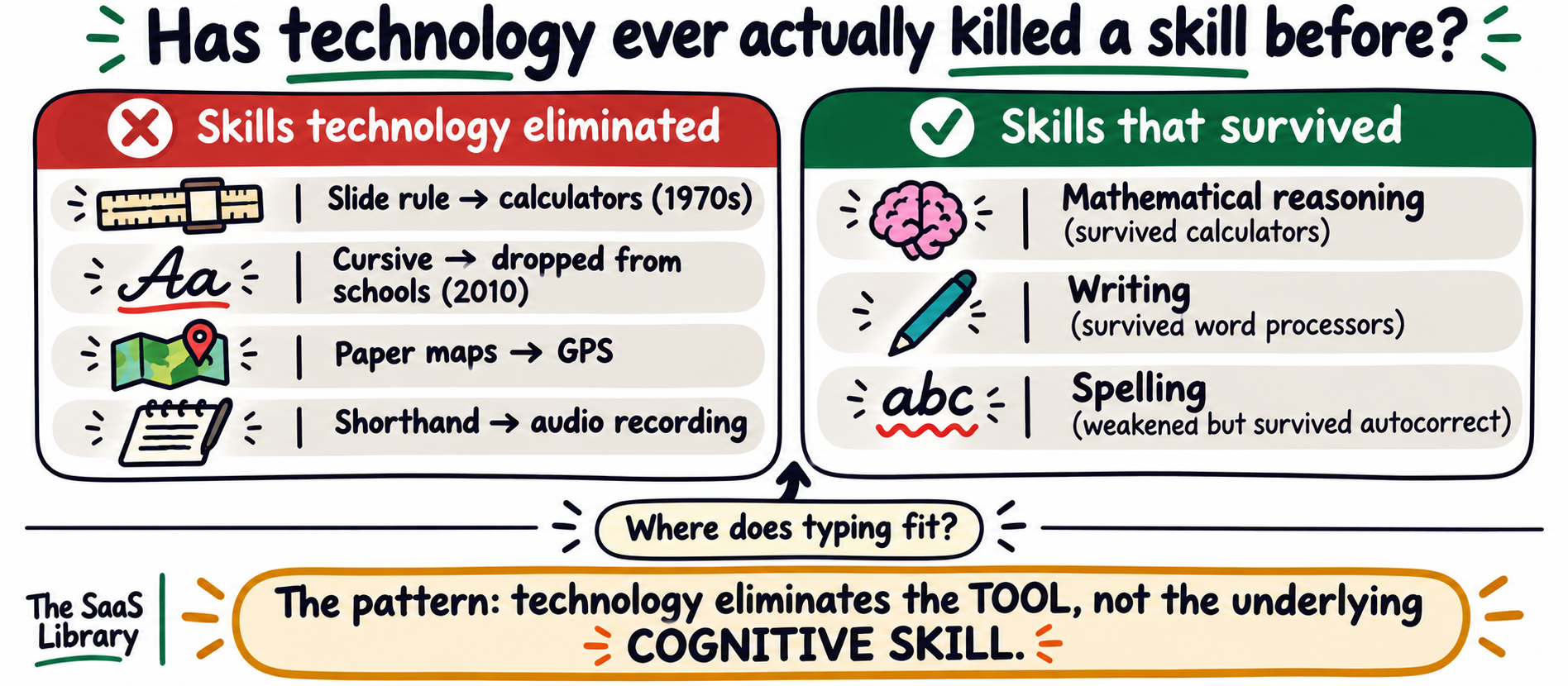
Yes — but the pattern is more specific than it looks. Technology tends to eliminate skills that were tools for reaching an outcome, while preserving skills that are the outcome itself. Slide rules disappeared when calculators arrived. Mathematical reasoning did not. The question for typing is which category it belongs to.
| Skill | What replaced it | What actually disappeared |
|---|---|---|
| Slide rule operation | Pocket calculators (1970s) | The manual skill of operating a slide rule |
| Cursive handwriting | Keyboard typing + Common Core (2010) | Formal instruction; reading ability in many under-35s |
| Paper map reading | GPS navigation (mainstream 2010) | The habit of planning a route without real-time guidance |
| Shorthand / stenography | Audio recording + word processors | The professional transcription skill |
Cursive is the most instructive case. It didn’t disappear because a tool replaced it. It disappeared because an institution — the US education system — decided it was no longer worth teaching. Common Core standards dropped cursive in 2010. Within three years, 41% of elementary teachers had stopped teaching it entirely. The consequences were real. As Drew Gilpin Faust, former President of Harvard University, observed in The Atlantic (October 2022): in one of her history seminars, two-thirds of students could not read the cursive script of primary historical documents.
Technology reliably eliminates a skill when it was primarily a means to an end and the replacement achieves the same outcome faster without meaningful quality loss. Keuffel and Esser, the dominant US slide rule manufacturer, produced their last slide rule in 1975 — just years after affordable calculators arrived. The skill disappeared. The underlying maths did not.
Typing is not purely a means to an end. For many people — writers, coders, editors, anyone who thinks on the page — the act of typing is part of the thinking process. That puts it in a different category from the slide rule.
Who is actually using these tools — and what do they say?
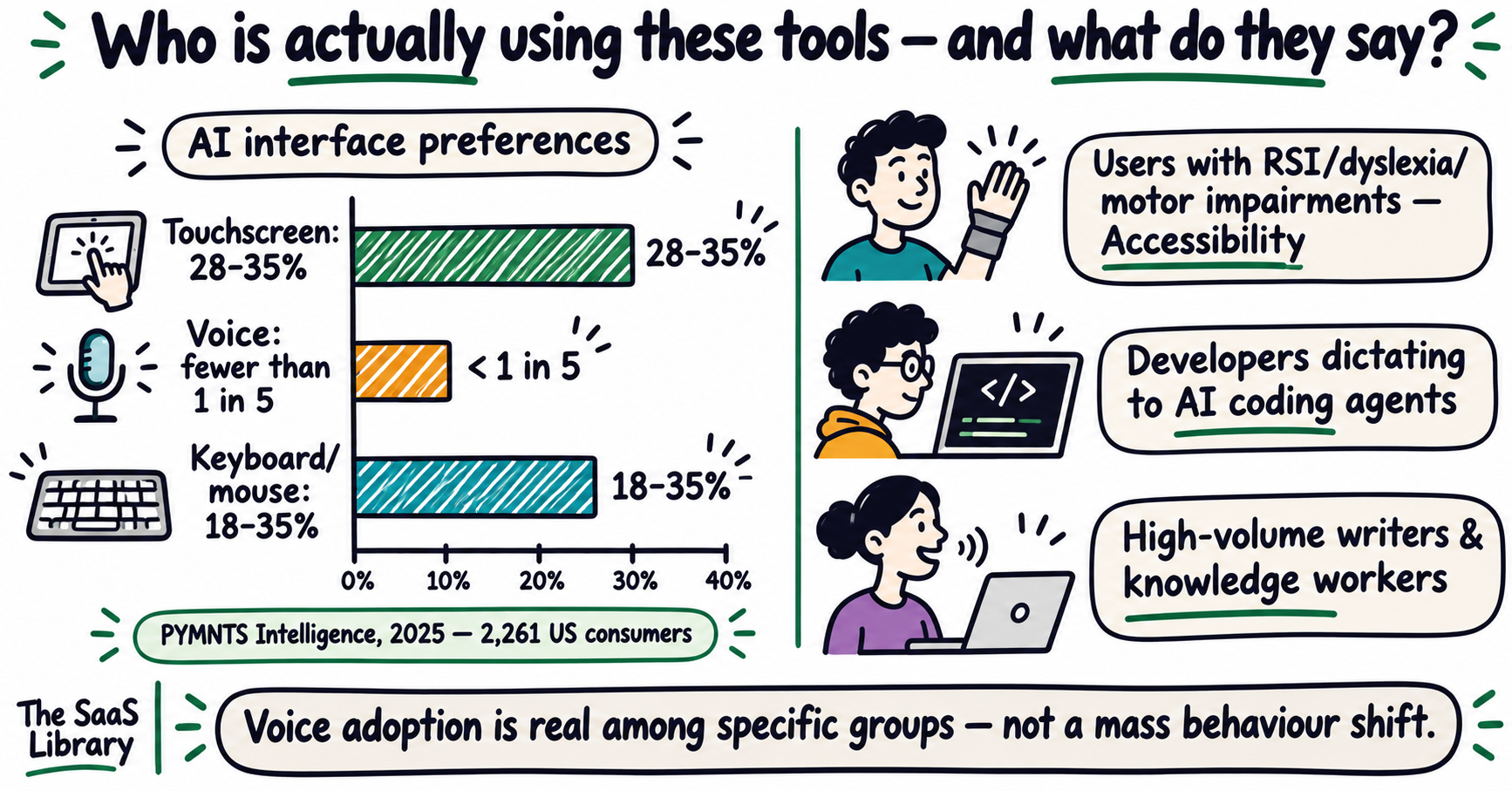
AI voice dictation tools have real and growing users, but adoption is narrower than the headlines suggest. Only 14% of knowledge workers preferred voice over typing when interacting with AI, according to a 2025 Jabra and London School of Economics study. A separate PYMNTS Intelligence survey found voice ranks as the least preferred way to interact with generative AI across every age group.
Who gets the most value from these tools
- People with physical barriers to typing. RSI, carpal tunnel, arthritis, Parkinson’s, motor impairments, dyslexia, and ADHD are all documented use cases. This is the strongest, most defensible case for the category.
- Developers prompting AI coding agents. A meaningful subset uses voice to describe intent to tools like Claude Code and Cursor — not to dictate code, but to dictate context.
- Knowledge workers with high writing volume. People dictating emails, reports, and meeting summaries report genuine time savings when the AI cleanup layer is reliable.
- Tech early adopters. The voicepilling conversation is primarily happening among people already using AI heavily.
What switchers actually say
- A developer switched from keyboard to voice for ergonomic reasons — chronic wrist pain from years of typing. After two weeks: wrist relief and richer AI prompts because his spoken context was more detailed than his typed versions. (Dmitry Zakharov, dev.to, April 2026)
- A writer with dyslexia used an AI voice tool for a full article and reported that voice removed the anxiety of spelling errors that had previously slowed her work. (Jasmine Mannan, Digital Trends, October 2025)
- Tech journalist Joanna Stern dictated her newsletter using a voice tool and noted it “feels very strange not to type.” Her 9-year-old son barely knows how to type — his school uses iPad voice dictation instead of teaching keyboarding. (The New Things, July 2026)
All three still use a keyboard for review, editing, corrections, and precise entries. None of them stopped typing. They stopped typing for the first draft of certain kinds of content.
Is the “3× faster” speed claim actually true?
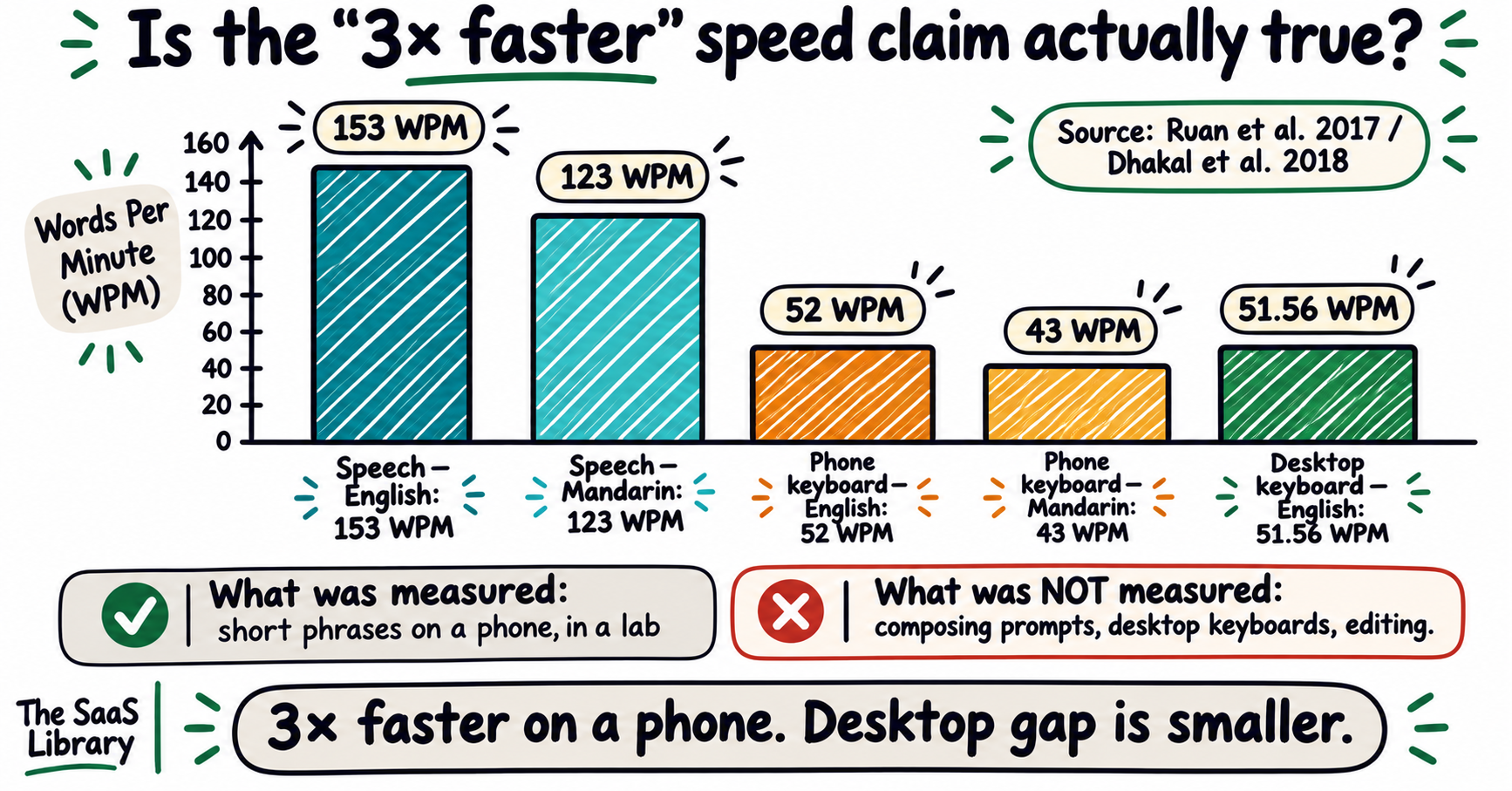
Partially. A peer-reviewed study did find that speaking into a smartphone was 2.93× faster than typing on the same phone’s keyboard — but it measured short-phrase transcription in a laboratory, not composing a prompt, drafting a document, or working at a desk. Every blog post and vendor page citing “3× faster” is using a real finding in a context it was not designed to cover.
The research is “Comparing Speech and Keyboard Text Entry for Short Messages in Two Languages on Touchscreen Phones” by Ruan, Wobbrock, Liou, Ng, and Landay (Proc. ACM IMWUT, December 2017). The study used an iPhone 6 Plus, Baidu’s Deep Speech 2, and standard iOS keyboards. Participants transcribed short, pre-given phrases — they did not compose original text.
Composing original prompts, desktop keyboard use, thinking time, editing an existing draft, entering code, numbers, names, or precise technical terms. The 52 WPM baseline is a phone keyboard, not a desktop. Voice versus desktop keyboard would show a smaller gap.
Where does typing still win?
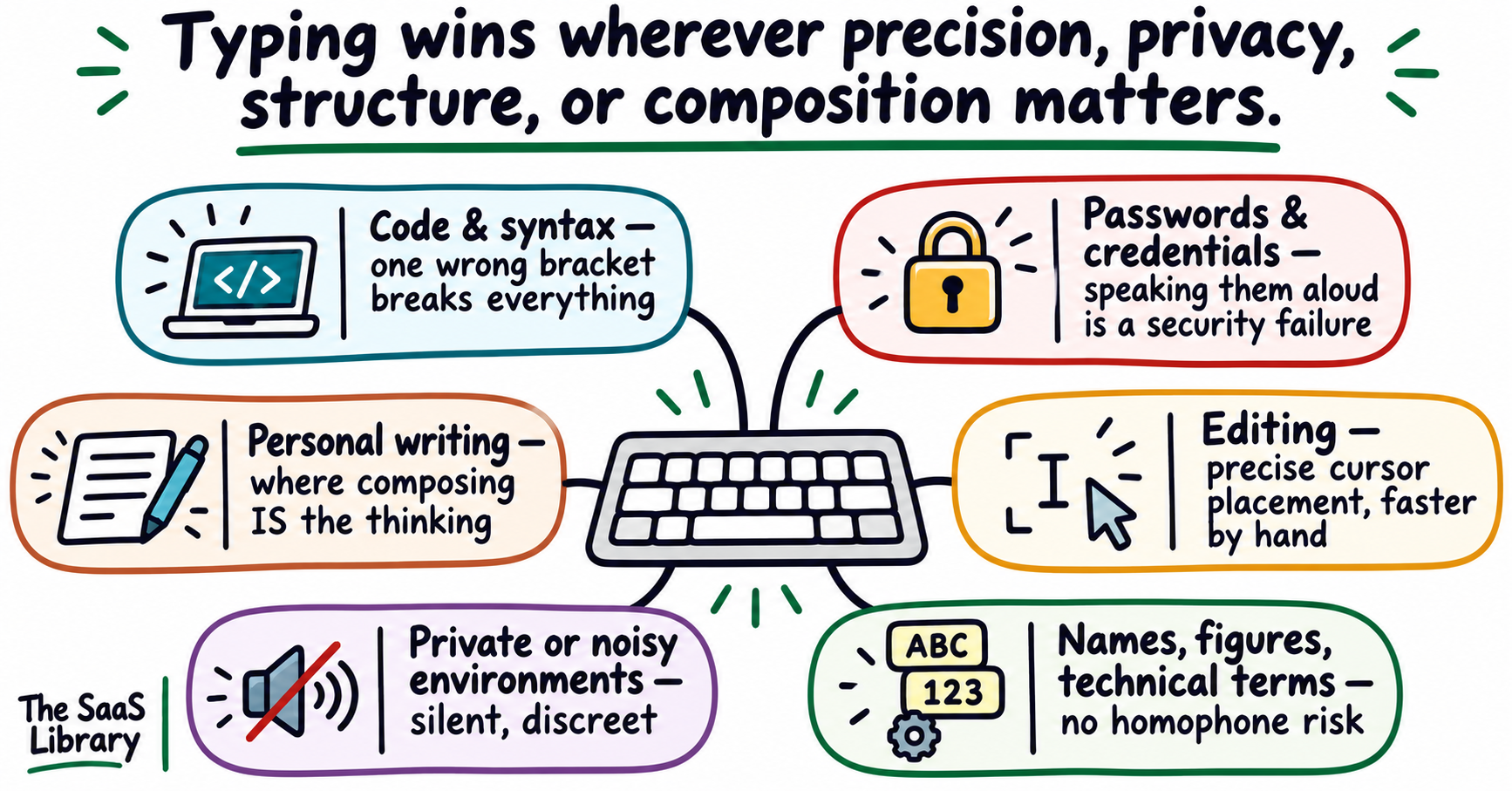
Typing wins wherever precision, privacy, structure, or composition matters — which covers most professional work: code, passwords, editing, legal and medical text, sensitive conversations, and any writing where the act of constructing sentences is part of the thinking process.
| Context | Why voice fails here | Why typing wins |
|---|---|---|
| Code and syntax | One misplaced bracket breaks output; voice misfires on symbols | Precise character-by-character control |
| Passwords and credentials | Speaking them aloud is a security failure in any environment | Silent, private, exact |
| Editing an existing draft | Moving one clause, deleting one word — faster by hand | Direct cursor placement and replacement |
| Names, figures, technical terms | Homophones and misrecognised proper nouns produce silent errors | No ambiguity on exact spelling |
| Shared or public environments | Open offices, public transport, meetings, late-night homes | No ambient noise, no privacy concern |
| Personal writing and composition | Spoken drafts sound like speech; composition IS the thinking | Thinking and writing happen simultaneously |
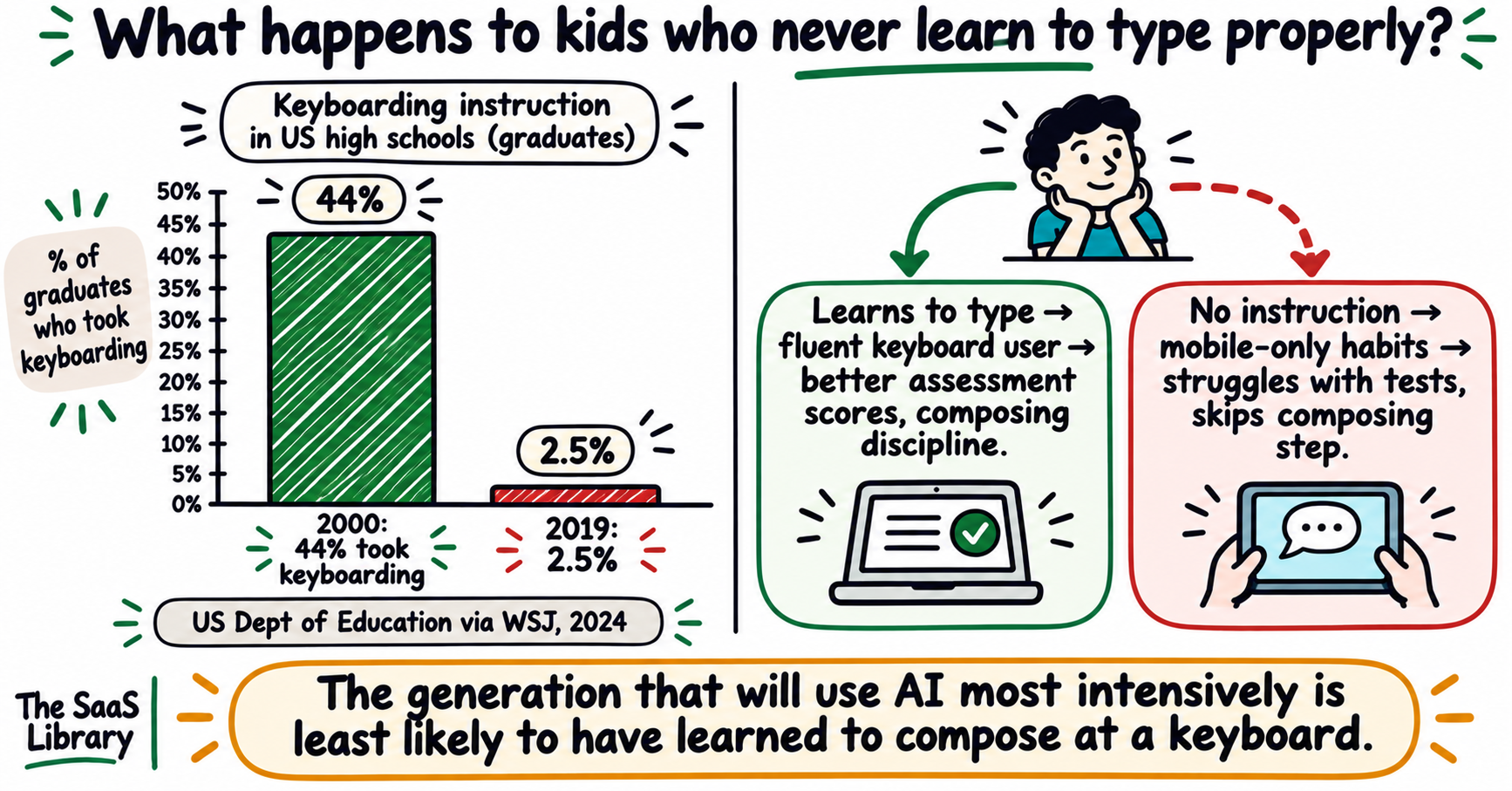
Formal keyboarding instruction in US high schools collapsed from 44% of graduates in 2000 to 2.5% in 2019, according to US Department of Education data reported by The Wall Street Journal (September 2024). That is a real change. But the Dhakal et al. CHI 2018 study of 168,000 volunteers found that self-taught typists who use fewer than ten fingers can be as fast as professionally trained typists. Course enrolment and actual proficiency are different things.
That covers where typing holds its ground. The rest of this article covers what voice prompting costs you as a thinker, what the research says, and how to use both methods to get better outputs from AI.
Getting useful output from AI tools is about more than input method — it’s about how you frame the request.
How Small SaaS Teams Compete With AI →What does voice prompting actually cost you as a thinker?
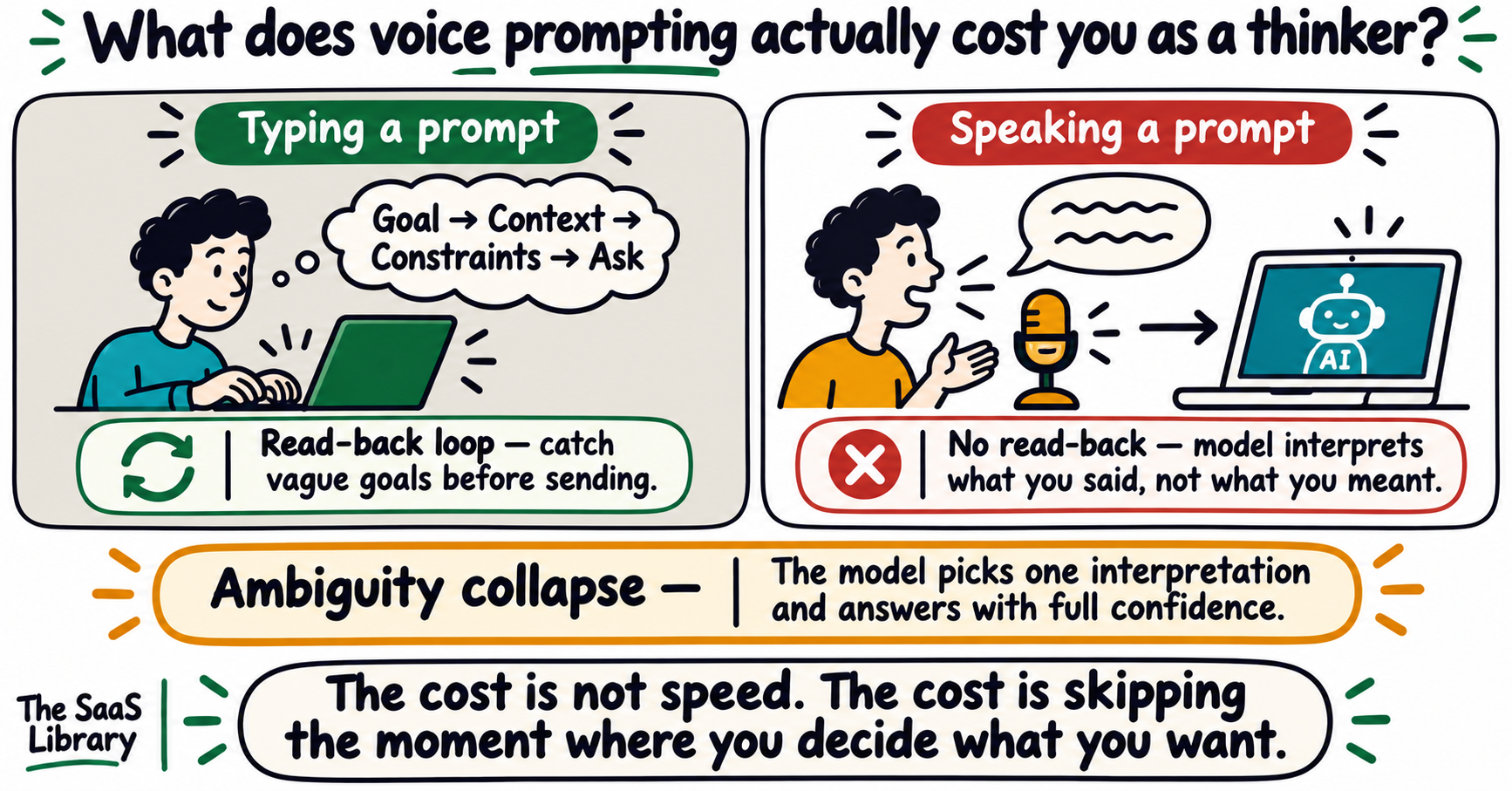
Voice prompting removes the moment where typing forces you to decide what you actually want before you send it. That moment is not incidental — it is where goal-stating discipline happens. When you skip it, you hand the model a vague request and let it decide what you meant. With AI, that is a specific and costly problem: a model does not ask what you meant. It picks an interpretation and answers it with full confidence.
This is the question none of the other articles on this topic ask. When you type a prompt, you produce visible text that you can read before you send it. That read-back loop — even a two-second one — is where most people catch the vagueness in their own requests. Speaking bypasses the draft. The words leave your mouth and arrive in the prompt field, often before you have read them back.
What LLMs do with vague input
Research from Harvard, Cornell Tech, and Northeastern University introduced the concept of “ambiguity collapse” — the phenomenon that occurs when an LLM encounters a term admitting multiple legitimate interpretations but produces a singular resolution, bypassing the deliberation and negotiation that humans would normally apply (Gur-Arieh, Wang, Fazelpour, arXiv:2603.05801, March 2026 — preprint).
Three reasons LLM-driven ambiguity collapse is distinct from ordinary human disambiguation:
- Scale: LLMs are always available. Any tendency to disambiguate is applied across millions of queries simultaneously.
- Finality: Model outputs are “often treated as the answer: a polished final output that arrives in confident prose.”
- No accountability: Human interpretive decisions are traceable. LLM disambiguation typically is not.
A separate 2026 study on coding models found that deliberately injecting underspecification into benchmarks increased collapse rates by up to 5.5 times (arXiv:2607.01953, July 2026 — preprint).
The danger isn’t an AI that gets it wrong. It’s an AI that gets the wrong thing precisely right.
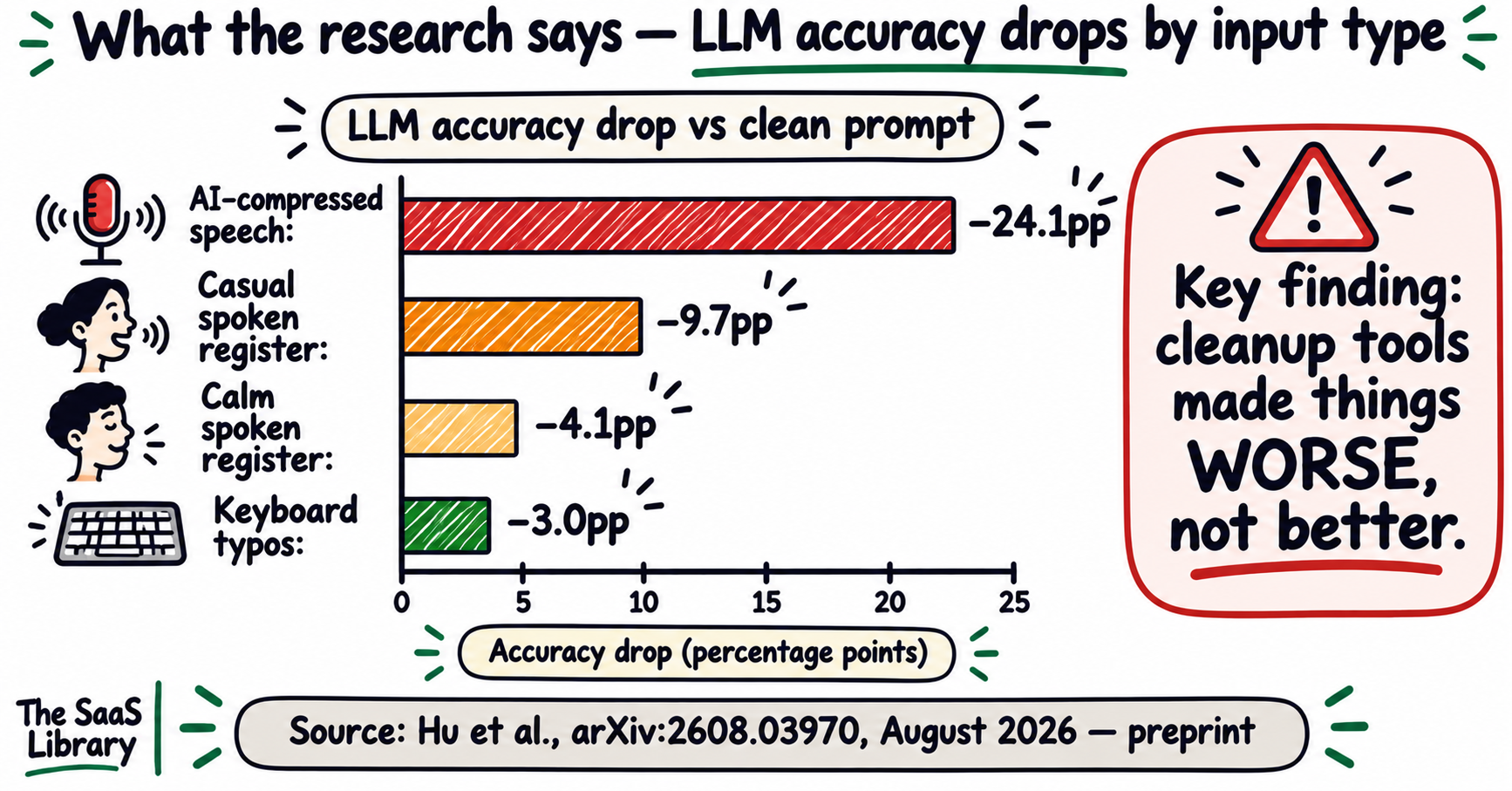
The Jabra/LSE study found voice-preferring users performed 20% worse on tasks requiring persuasion and refinement (vendor-commissioned — labeled accordingly). The USC/ISI preprint found casual spoken register cut LLM accuracy by 9.7 percentage points versus 3.0 percentage points for keyboard typos — from run-on structure, not from filler words. For more on how the same LLM gives different outputs based on how a request is framed, see why ChatGPT gives different answers to the same question.
What does the research say about voice versus typed input to AI?
Two 2026 preprints address this directly. The first found that voice-transcription perturbations reduced LLM accuracy across every model tested — by roughly three times as much as keyboard typos — and that the damage came from disrupted sentence structure, not filler words. The second found that the input method matters less than whether you do the thinking yourself.
AI dictation tools that rewrite your speech into “textbook” form before sending it to the model produced the worst accuracy drops of all tested conditions — worse than casual rambling. Compression reorders and drops details, breaking the relationship between facts and their premises.
Seven findings from Hu et al. worth noting:
- Voice-transcription perturbations reduced accuracy across every model tested.
- Keyboard perturbations cost less — models absorbed many before accuracy dropped.
- Filler words (“um,” “like”) matter but are not the main cause — removing them from transcripts did not recover accuracy.
- The damage came from structural disruption: casual speech attaches facts to wrong premises in run-on sentences.
- Lightweight model adaptation (fine-tuning) did not reliably fix voice damage.
- Extended reasoning (thinking budget) recovered keyboard accuracy almost entirely but left spoken registers untouched.
- Accuracy losses showed up only on tasks where the model must construct an answer (math, code) — not on multiple choice.
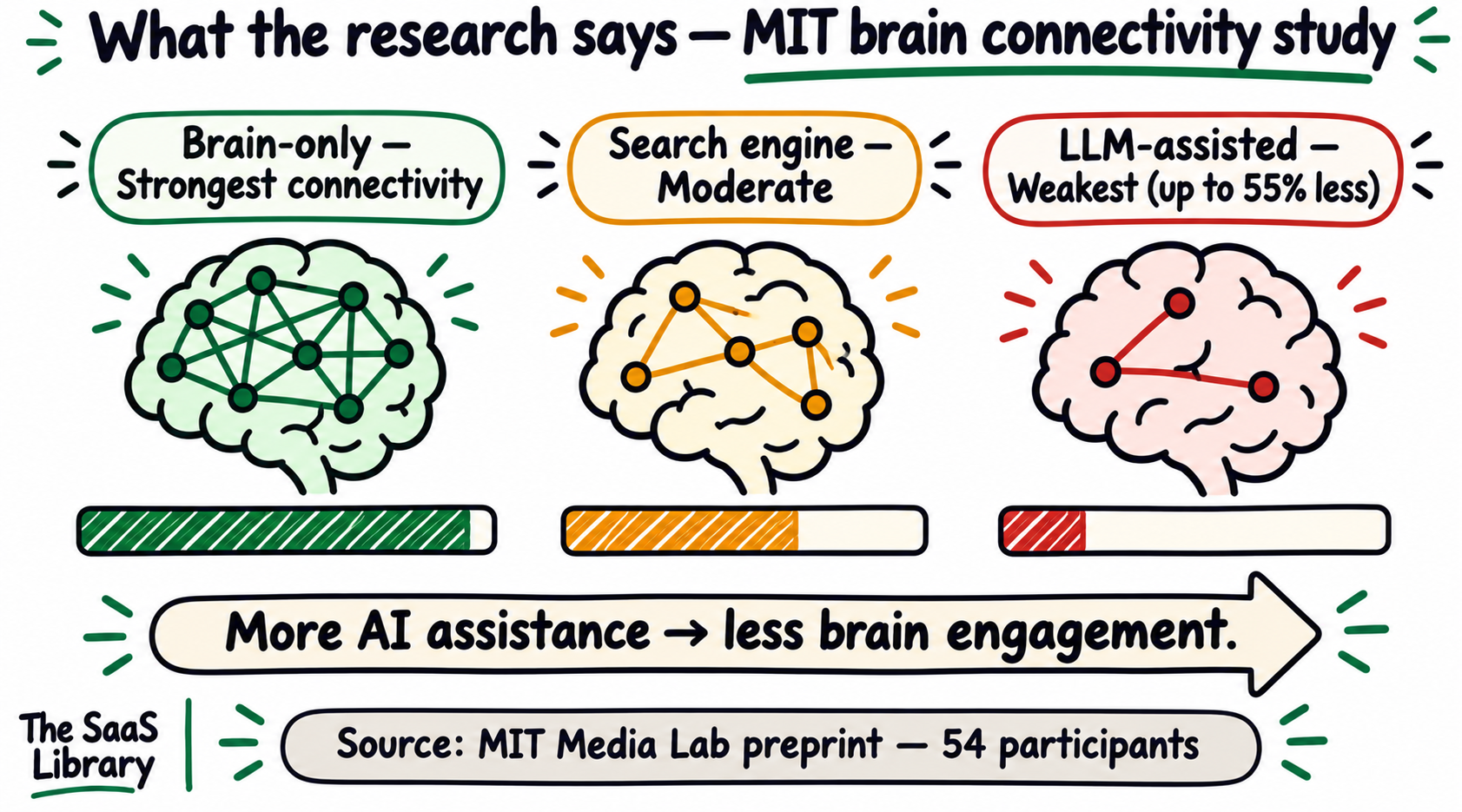
What both studies establish together: input structure matters more than input speed for AI output quality, and letting AI produce the work reduces your engagement with it. The input method is secondary. The thinking discipline is primary.
What happens to kids who never learn to type properly?
The honest answer is that we do not yet know the full consequences — but the early signals are consistent enough to take seriously. Formal keyboarding instruction in US schools has collapsed. Children are growing up on touchscreens. As assessments move online, students who cannot type fluently are at a measurable academic disadvantage.
Joanna Stern wrote about her 9-year-old son: “barely knows how to type. They don’t teach it in school anymore.” Her response: she started what she called “Mom Teaches Typing Camp” over the summer (The New Things, July 2026). A December 2025 study from Edith Cowan University found that more than 96% of teachers believed students’ keyboarding skills contributed directly to their performance on national online exams (EurekaAlert, December 2025).
It is difficult to correct children as they get older if they are not adequately taught the foundations of computer-based writing, including keyboarding skills such as key locations and hand and finger positions.
Teaching children to type is cheap insurance. The skill takes roughly 20–30 hours of structured practice to reach useful fluency. The generation that will use AI most intensively is the one least likely to have learned to compose at a keyboard. That is worth fixing now.
Will better AI models eventually make this whole argument irrelevant?
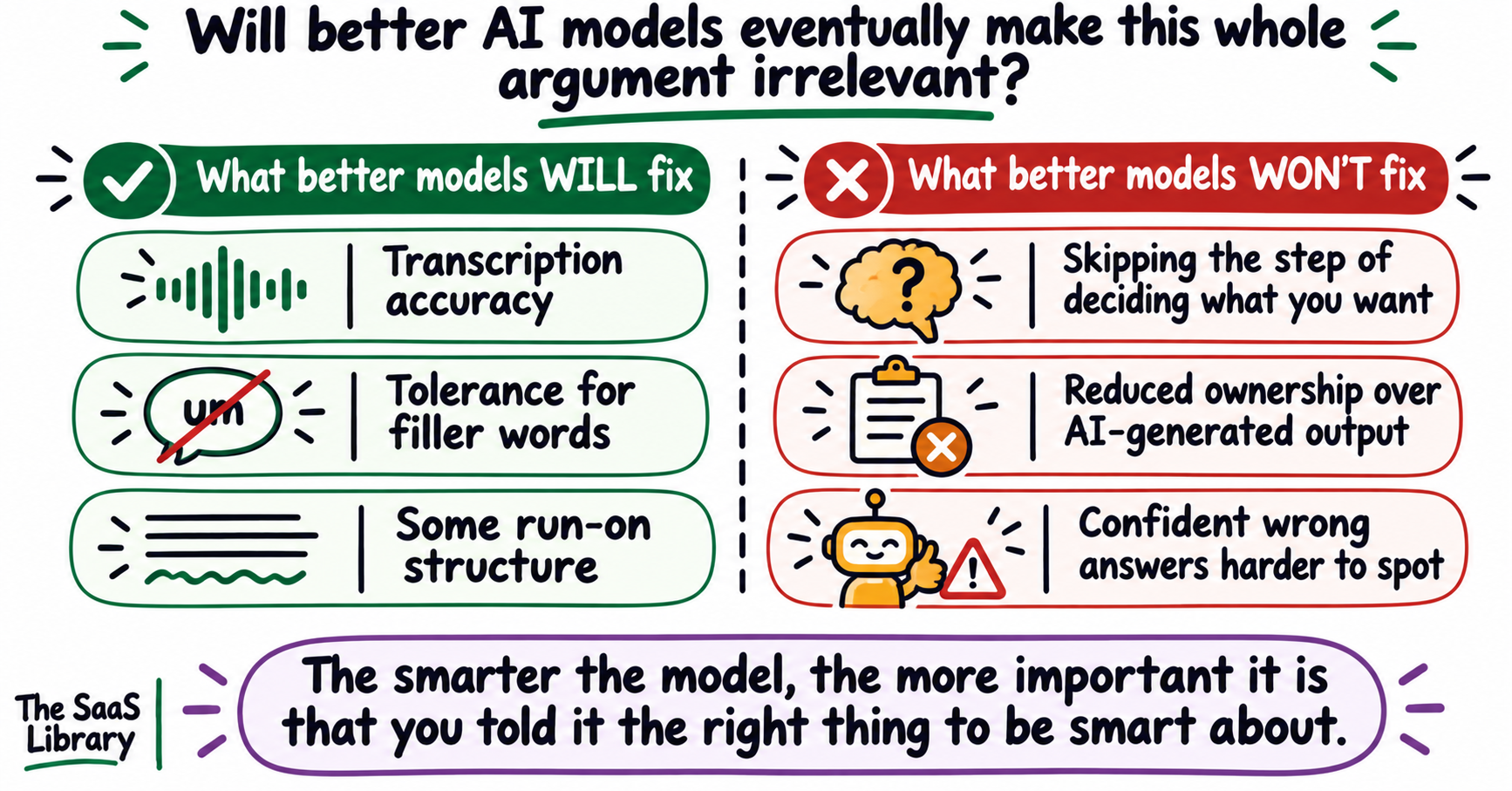
Partly. Models will get better at parsing rambling, unstructured speech. The transcription problem is solvable and is being solved. But the argument about goal-stating discipline is not primarily about what the model can handle — it is about what happens to you when you skip deciding what you want before you ask for it. Smarter models make confident wrong answers more convincing, not less likely.
| What better models WILL fix | What better models WON’T fix |
|---|---|
| Transcription accuracy | Skipping the step of deciding what you want |
| Tolerance for filler words | Reduced ownership over AI-generated output |
| Some run-on structure | Confident wrong answers getting harder to spot |
Even if a future model could perfectly interpret every rambling voice prompt, the person giving that prompt would still not have done the work of deciding what they wanted. The output might be better. The thinking would still have been skipped. The “ambiguity collapse” research (Gur-Arieh et al., arXiv:2603.05801) makes the point clearly: a more capable model produces a more polished, confident, coherent answer to whatever question it thought you were asking. That answer is harder to identify as wrong. The error is buried under competent prose.
The Hu et al. preprint finding confirms it directly: enabling extended reasoning recovered keyboard-channel errors almost entirely but left spoken-register penalties largely untouched. Reasoning repairs operators that leave the original question tokens in place. It cannot repair operators that destroy them.
For where the AI frontier is heading, see whether AGI could arrive before 2030.
Is the real threat voice tools — or something else entirely?
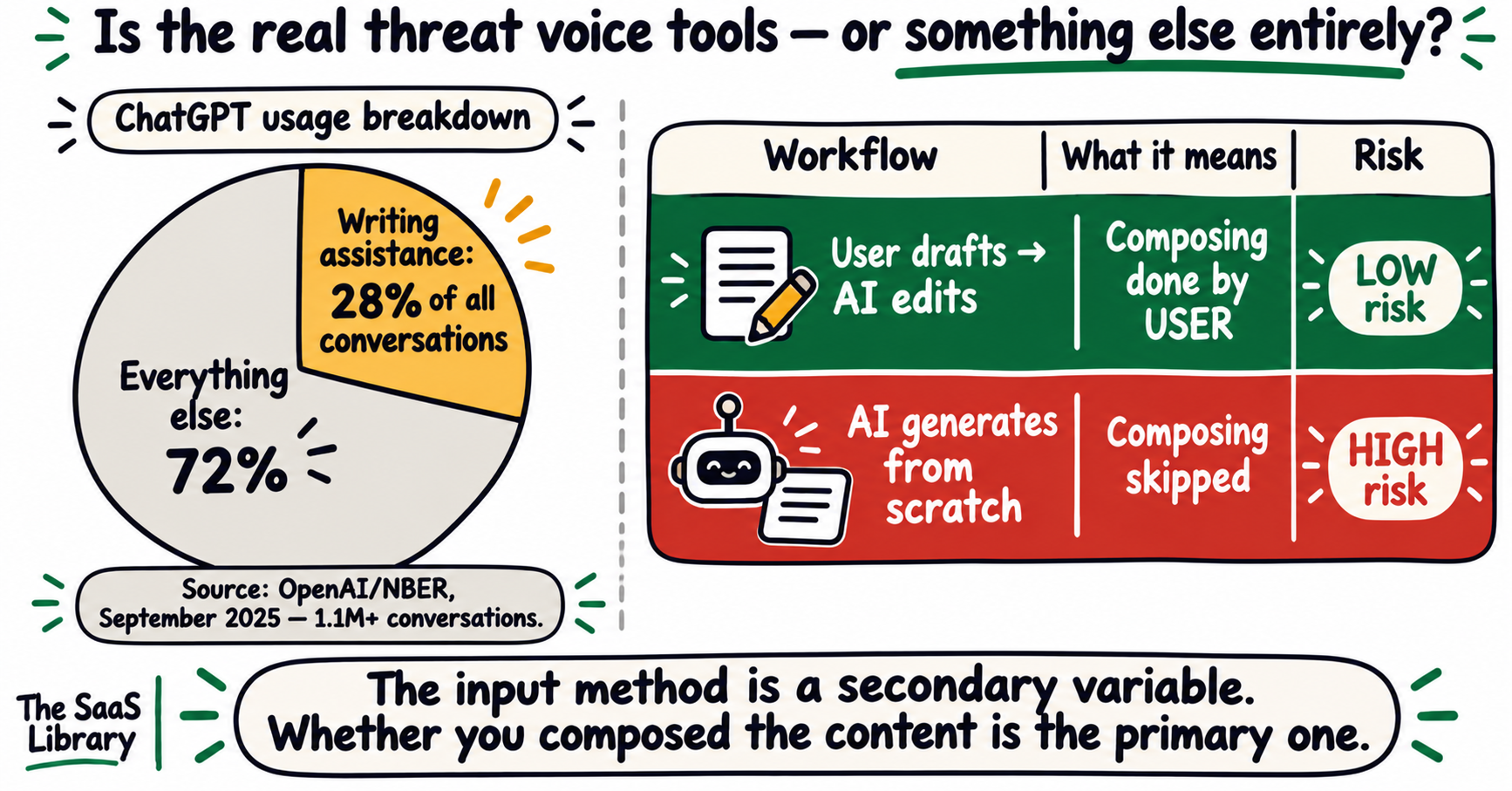
Voice tools are not the real threat. They change the input method. The real threat is outsourcing the thinking that writing requires — the composing, structuring, and revising that forces you to decide what you actually mean. That is not a voice problem. It is an AI writing assistance problem. And according to OpenAI’s own usage data, it is already the most common thing people do with ChatGPT.
| Interaction type | Composing done by | Risk level |
|---|---|---|
| Voice prompt → model answers | User | Low |
| Typed prompt → model answers | User | Low |
| User draft → model edits | User | Low |
| “Write me X about Y” → model generates | Model | High |
| Reviewed and revised model output | User + model | Low if review is genuine |
The variable is not the input method. The variable is whether the user composed the content, reviewed it critically, and owns the output. See also: why AI is destroying SaaS thought leadership — the same argument applies at the individual level.
So what should you actually do differently when prompting AI?
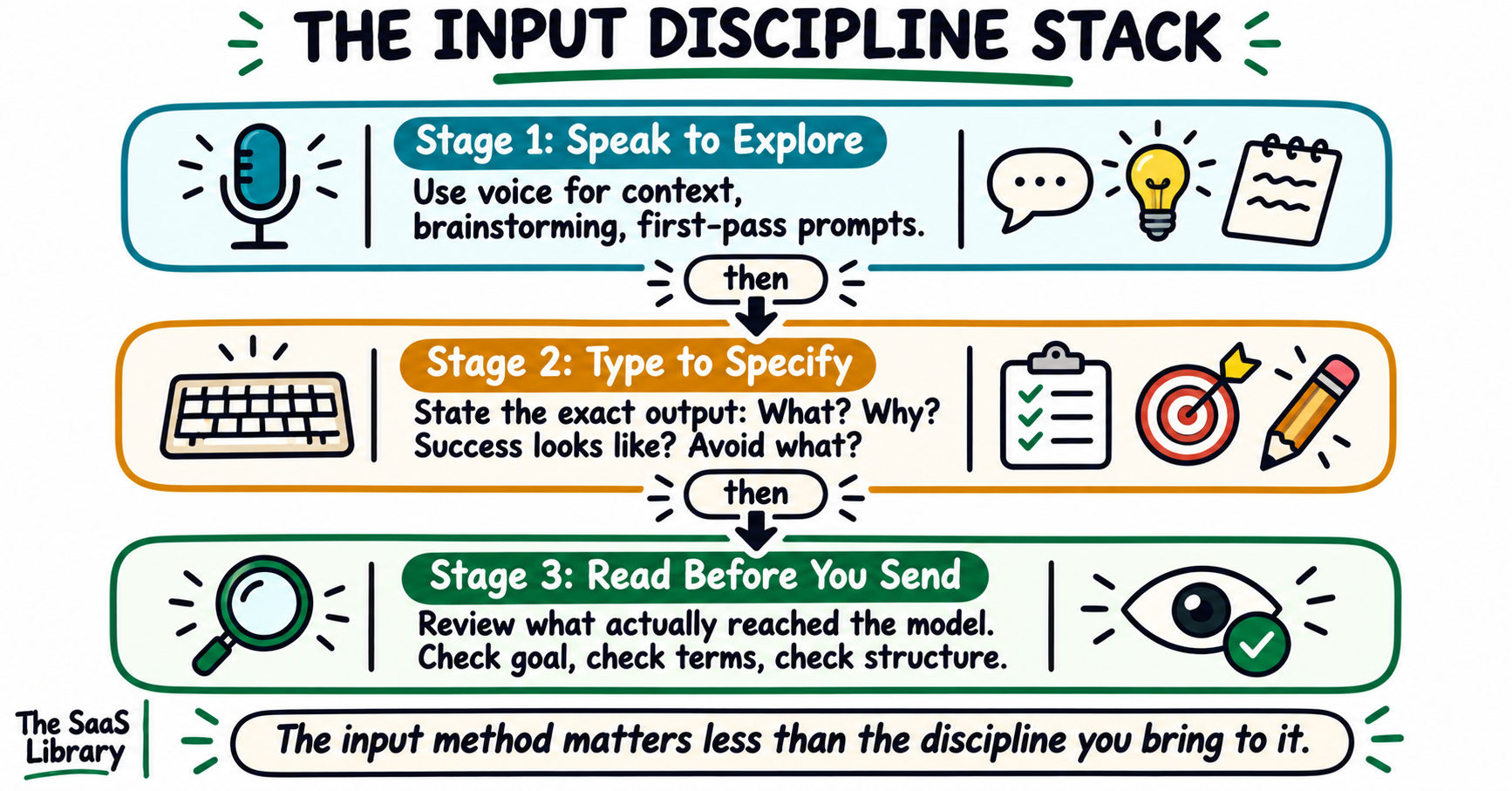
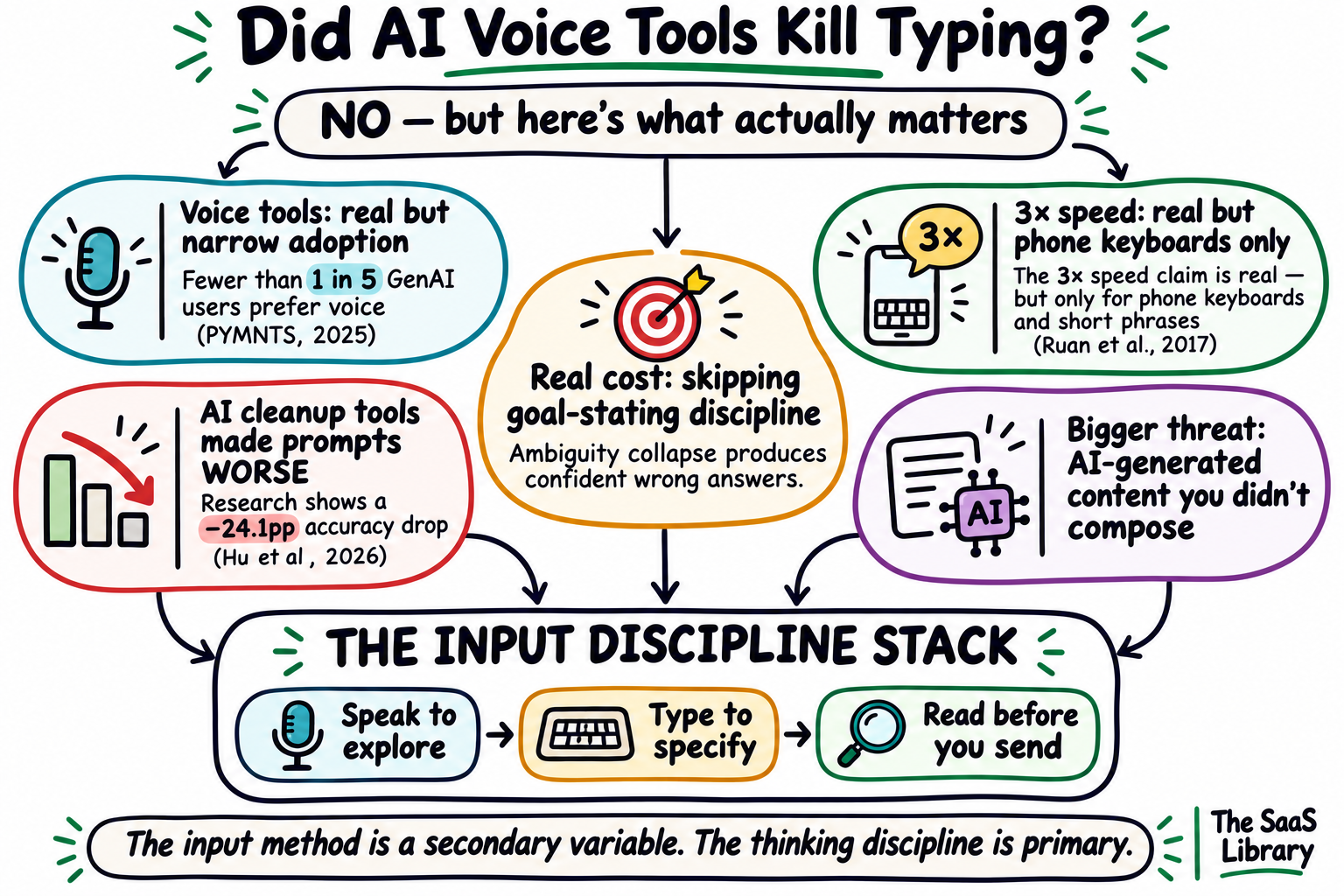
Apply the Input Discipline Stack: speak to explore, type to specify, and read before you send. The input method matters less than whether you have stated your goal clearly, structured the key information, and verified what actually reached the model before it started answering.
Everything in this article points to the same practical conclusion. The debate is not really about voice versus typing. It is about whether you bring discipline to the moment before the model responds.
The input method is secondary. What kills your AI output quality is the assumption that the model will figure out what you meant. It will not. It will figure out what you said — with full confidence — and answer that instead. Apply the Input Discipline Stack and the input method stops mattering.
Conclusion
AI voice tools did not kill typing. They changed one part of a workflow that most people were already changing anyway. The real question was never about the input method — it was about whether the thinking discipline that typing once enforced would survive the shift.
The Input Discipline Stack answers that. Speak to explore. Type to specify. Read before you send. Apply it regardless of which tool you use, and the input method stops mattering.
What you say to an AI is only as good as the clarity with which you said it.
Explore more AI tools, workflows, and what actually works for modern teams.
Explore AI & Automation at TSL →Frequently Asked Questions
Did AI voice tools kill typing?
AI voice tools did not kill typing. Voice remains the least preferred interface for generative AI across all age groups, with fewer than 1 in 5 users citing it as the easiest method of interaction (PYMNTS Intelligence, 2025). Typing is still required for code, passwords, editing, precise text entry, and any writing where composition is part of the thinking process.
Is voice typing faster than keyboard typing?
Voice typing is faster than keyboard typing for short-phrase input on a phone, in controlled laboratory conditions. A peer-reviewed Stanford, University of Washington, and Baidu study found speech averaged 153 WPM versus 52 WPM for a phone keyboard in English — 2.93 times faster (Ruan et al., Proc. ACM IMWUT, 2017). That figure applies to transcribing given phrases on mobile, not to composing prompts or documents on a desktop.
Does voice prompting give better AI results than typing?
Voice prompting does not reliably give better AI results than typing. A 2026 USC preprint found that voice-transcription perturbations reduced LLM accuracy by an average of 9.7 percentage points, compared to 3.0 percentage points for keyboard typos (Hu et al., arXiv:2608.03970, August 2026 — preprint on small open models). The accuracy drop came from disrupted sentence structure, not filler words. Calm, structured spoken input performed closer to typed input than casual, conversational speech.
What are AI voice dictation tools and how do they work?
AI voice dictation tools are software applications that convert spoken words into polished text using a two-stage process. First, an automatic speech recognition (ASR) engine transcribes speech into raw words. Second, an AI cleanup layer removes filler words, adds punctuation, corrects grammar, and formats the output. The finished text is inserted directly into whichever application has the cursor.
Will typing become obsolete because of AI?
Typing will not become obsolete because of AI in any foreseeable timeframe. Keyboards remain the most efficient input method for code, passwords, precise text entry, editing, and any professional environment where privacy or accuracy is required. The more relevant risk is not that typing disappears as a motor skill but that the habit of composing structured text before sending it to AI weakens with reduced practice.
What is the Input Discipline Stack?
The Input Discipline Stack is a three-stage framework for getting better outputs from AI regardless of input method. Stage one: speak to explore — use voice for context-heavy, exploratory, or first-pass prompts. Stage two: type to specify — use the keyboard to state the exact output wanted, with format, constraints, and goal named explicitly. Stage three: read before you send — review the prompt field before submitting to catch vague goals, transcription errors, and unstructured sentences that cause models to misinterpret intent.
Does how you input a prompt affect what the AI gives back?
Yes. How you input a prompt affects AI output quality, primarily through the structure of the input rather than the input method itself. The Hu et al. 2026 preprint found that casual spoken register — characterised by run-on sentences that attach facts to incorrect premises — reduced LLM accuracy significantly more than keyboard typos. AI cleanup tools that compress spoken prompts into tidy text before sending them to the model produced the largest accuracy drops of all tested conditions.
What happened to the skills that technology replaced?
Skills that technology replaced generally fell into one of two categories. Skills that were tools for reaching an outcome — operating a slide rule, reading a paper map, writing in cursive — largely disappeared from general use once better tools arrived. Skills that were part of the outcome itself — writing, reasoning, composing — survived because the tool change did not eliminate the need for the underlying cognitive process. The question for typing is which category it belongs to.
Is voice prompting better for brainstorming with AI?
Voice prompting is better than typing for brainstorming with AI in specific conditions. Speaking is faster for getting context onto the screen, produces longer prompts with more background detail, and suits exploratory thinking where structure matters less than speed. The risk is that brainstorming sessions produce unstructured, premise-scrambled prompts that cause models to misread the actual question. The Input Discipline Stack addresses this: use voice for the brainstorm, then type the specific ask before sending.
Why do AI models answer confidently even when the prompt is vague?
AI models answer confidently when prompts are vague because they resolve ambiguity internally and commit to a single interpretation without signalling uncertainty. Research from Harvard, Cornell Tech, and Northeastern University describes this as “ambiguity collapse” — the phenomenon where a model encounters a term with multiple legitimate interpretations but produces a singular resolution, bypassing the deliberation that humans would apply (Gur-Arieh, Wang, Fazelpour, arXiv:2603.05801, March 2026 — preprint).
What does the MIT ChatGPT brain study actually show?
The MIT study “Your Brain on ChatGPT” found that participants who wrote essays using ChatGPT showed weaker brain connectivity compared to those who wrote without AI assistance, as measured by EEG (Kosmyna et al., arXiv:2506.08872, June 2025 — preprint, 54 participants). LLM-assisted writers also felt lower ownership and struggled to recall essays they had just written. The study is a preprint, not peer-reviewed, and has been formally critiqued on methodology. The lead author stated the study did not find “brain rot” — it found reduced engagement during AI-assisted composition.
Do children need to learn to type if AI voice tools exist?
Children still need to learn to type even as AI voice tools become more capable. Keyboard proficiency directly affects performance on computer-based standardised assessments, with more than 96% of teachers reporting this connection (Edith Cowan University, December 2025). Typing is required for code, passwords, editing, and precise professional communication. The skill takes roughly 20–30 hours of structured practice to reach useful fluency, and is significantly harder to develop as an adult than as a child.
- Ruan, S., et al. (2017). Comparing Speech and Keyboard Text Entry for Short Messages in Two Languages on Touchscreen Phones. Proc. ACM IMWUT 1(4). DOI: 10.1145/3161187
- Dhakal, V., et al. (2018). Observations on Typing from 136 Million Keystrokes. CHI 2018.
- Hu, C., et al. (2026). Should We Type or Talk to LLM Agents? arXiv:2608.03970 — preprint, not peer-reviewed.
- Kosmyna, N., et al. (2025). Your Brain on ChatGPT. arXiv:2506.08872 — preprint, not peer-reviewed.
- Gur-Arieh, R., Wang, A., & Fazelpour, S. (2026). Ambiguity Collapse by LLMs. arXiv:2603.05801 — preprint.
- Chatterji, A., et al. (2025). How People Use ChatGPT. NBER Working Paper 34255.
- PYMNTS Intelligence. (2025). Nobody’s Talking: Voice Interfaces Face Hurdles for Wide Adoption.
- Jabra / London School of Economics. (2025). Beyond the Keyboard. GlobeNewswire, October 2025 — vendor-commissioned research.
- Malpique, A., et al. (2025). Keyboarding skills and academic performance. Edith Cowan University, EurekaAlert, December 2025.
- Stanković et al. (2026). Comment on: Your Brain on ChatGPT. arXiv:2601.00856.
- Palin, K., et al. (2019). How Do People Type on Mobile Devices? MobileHCI 2019.
- Microsoft Research. (2016). Historic milestone: human parity in conversational speech recognition. — vendor source.
- Urry, H. L., et al. (2021). Don’t Ditch the Laptop Just Yet. Psychological Science 32(3).
- Google. (2019). Understanding searches better than ever before. Google Blog.