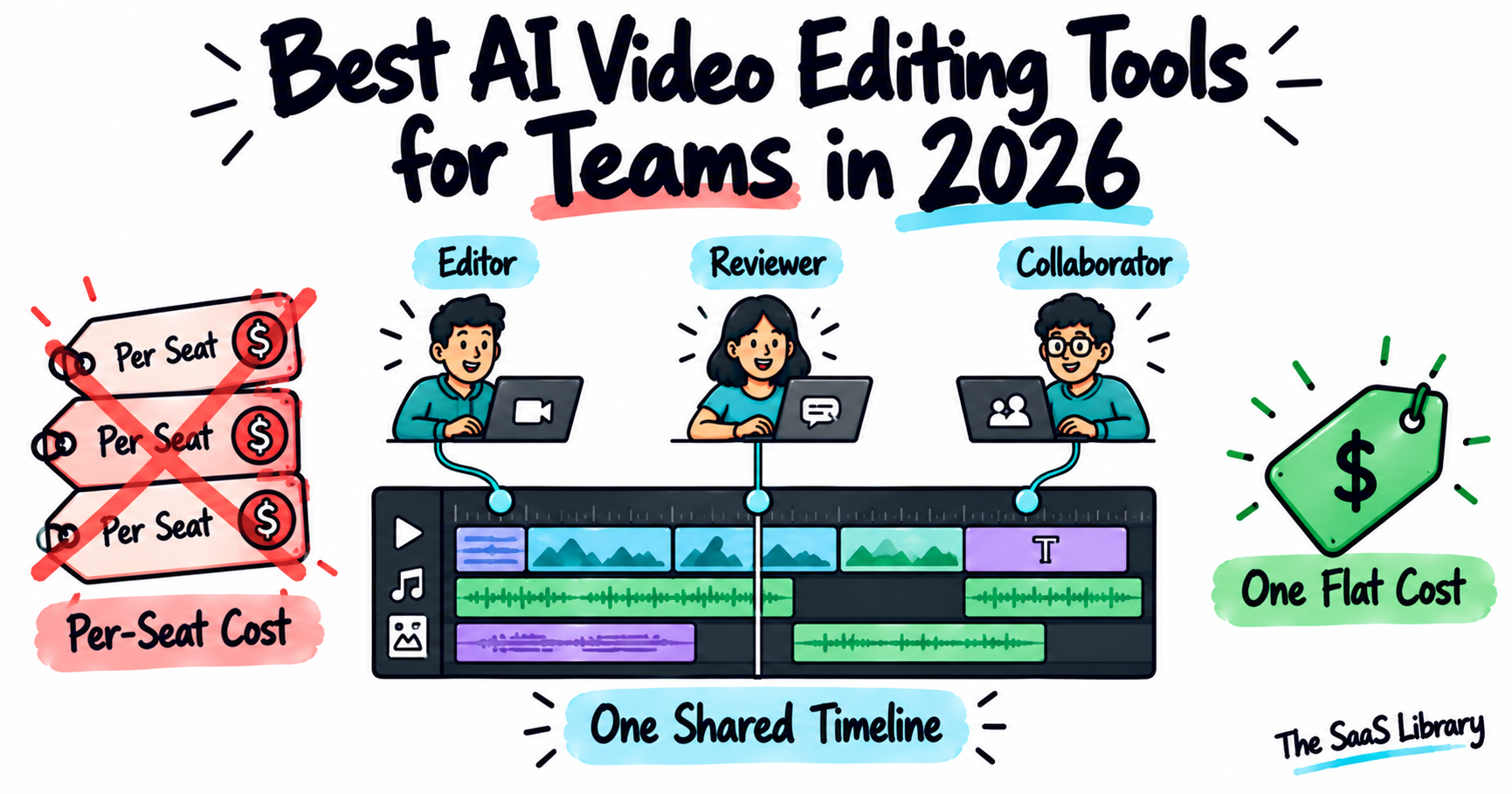
A team editing video together has different needs than a single editor — feedback has to land precisely rather than as a general note, and the best AI video editing tools for teams in 2026 are judged on whether cost scales fairly as more people get involved.
The best AI video editing tool for teams in 2026 is Invideo Editor for real-time collaborative editing with no per-seat cost, since editors, collaborators, and AI agents all work inside the same shared project. Frame.io remains the stronger, more established choice specifically for structured, frame-accurate review — though its pricing scales per seat. DaVinci Resolve and Premiere Pro each fit narrower, specific team setups.
What Does a Team Actually Need From a Video Editing Tool?
A team actually needs three things from a video editing tool that a single editor doesn’t: several people reviewing the same cut without confusion, feedback that lands precisely on a specific shot rather than as a general note, and a cost structure that doesn’t punish a project for having more than one or two people involved.
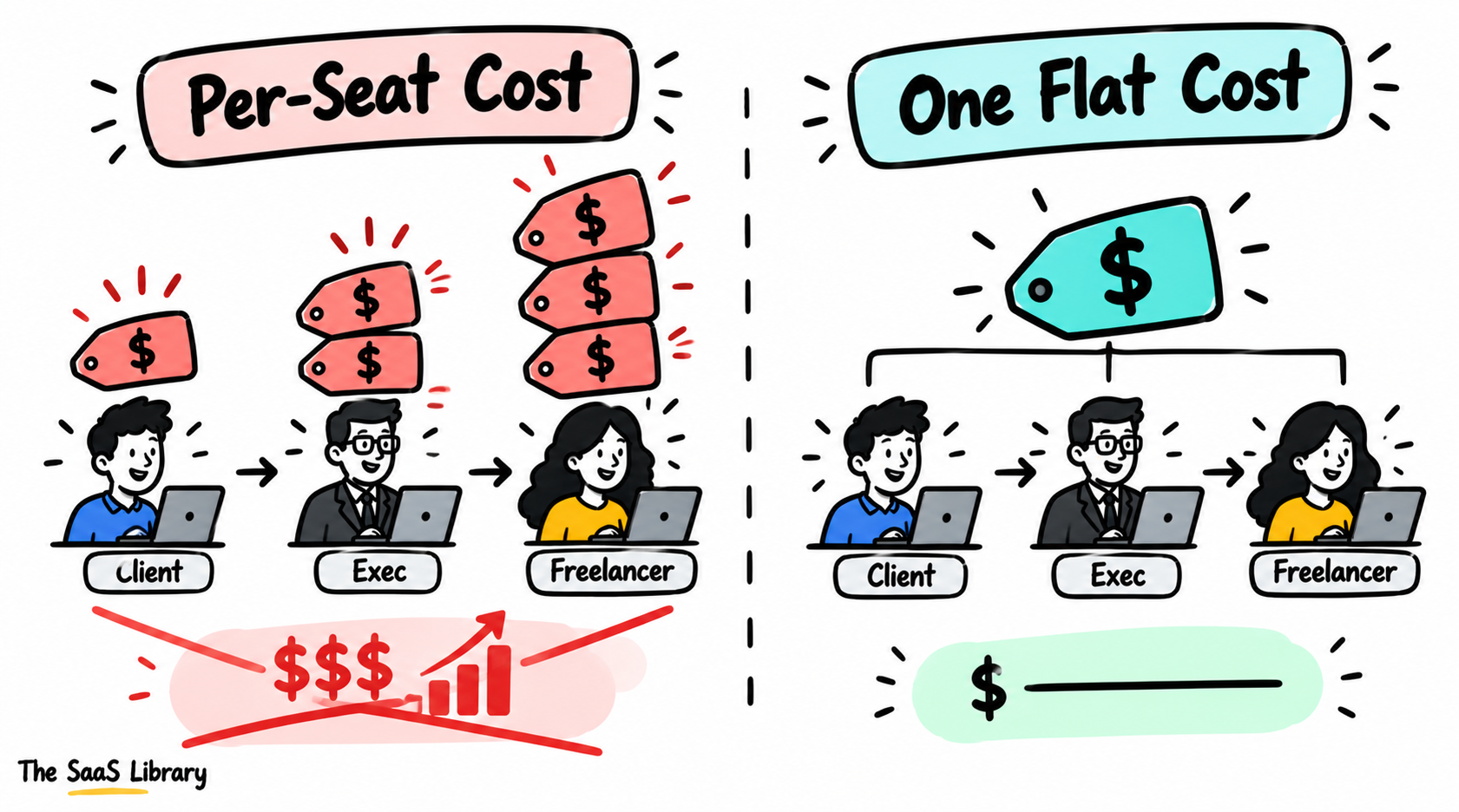
That last point is where most tools genuinely differ. Per-seat pricing means the cost of collaboration scales directly with headcount — adding a client, an exec reviewer, or a freelance specialist means another line on the bill every month, even for occasional access. A tool priced around the project instead of the person avoids that entirely.
This also splits into two related but separate jobs: actually editing together on the same timeline, and reviewing and approving what’s already been cut. If you’re comparing tools without separating those two needs, you’ll misjudge which one actually solves your bottleneck.
Invideo Editor’s collaboration description in several team-editing roundups closely mirrors its own September 2026 launch announcement and product FAQ. The underlying feature is real and independently confirmed — but it’s worth knowing before treating any single roundup’s #1 pick as independent testing, including this one.
Which AI Video Editing Tools Did We Actually Compare?
We compared four video editing tools for teams against their current, live pricing pages, since per-seat pricing especially is easy to understate when a roundup doesn’t check the exact seat count a price applies to.
| Tool | Best For | Collaboration Mechanism | Starting Price (verified) |
|---|---|---|---|
| Invideo Editor | Real-time collaborative editing, no per-seat cost | Editors, collaborators, and AI agents in one shared project | Timeline free; agents from $17–20/mo |
| Frame.io | Structured, frame-accurate review inside Adobe’s ecosystem | Timestamped comments, annotations, version stacks | Free (2 seats); Pro $15/seat/mo |
| DaVinci Resolve | Multi-user collaborative color and editing | Blackmagic Cloud project sharing (Studio) | Free; Studio $295 one-time |
| Adobe Premiere Pro | Teams standardized on Creative Cloud | Native Frame.io panel plus team libraries | $22.99/mo per user |
All prices confirmed directly on each vendor’s own pricing page in September 2026.
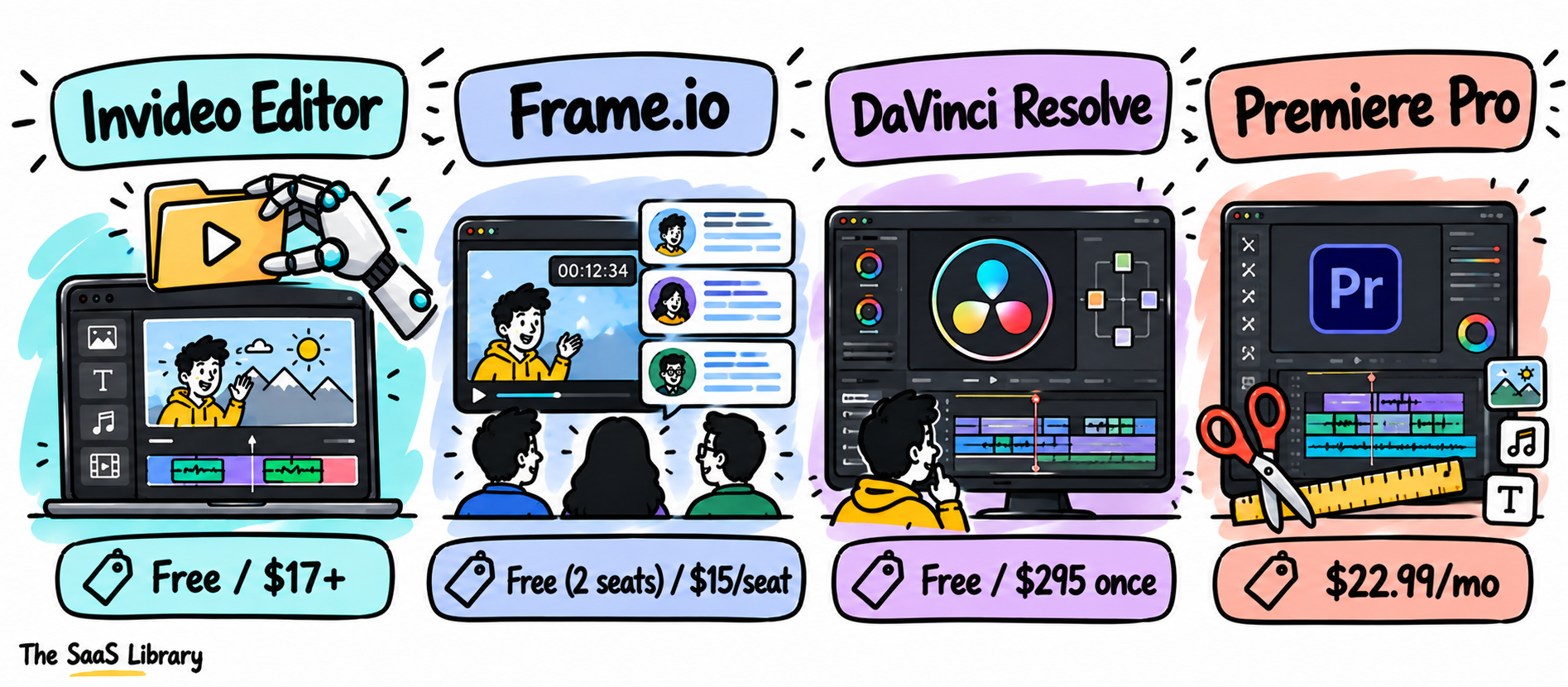
If you’re only checking the sticker price before choosing, you’ll miss the real number — multiply Frame.io’s or Premiere Pro’s per-seat cost by your actual reviewer count, not just your editor count.
For how this same collaboration comparison plays out for solo creators instead of teams, see Best AI Video Editors for YouTube Creators in 2026.
Is Invideo Editor the Best Choice for Real-Time Collaboration Without Per-Seat Cost?
Invideo Editor is built around collaboration from the ground up rather than as a review layer added on top of a single-user editor: editors, collaborators, and AI agents all work inside the same shared project in real time, so a note like “reframe this shot” or “swap this take” from any team member edits directly on the timeline rather than sitting as a comment waiting for someone else to act on it later.
Confirmed directly on invideo’s own September 2026 launch announcement: your team can see who else is in the project while you cut, one person can work the timeline while another reviews, and a shareable review link lets anyone leave frame-accurate comments that the assistant editor can act on directly. A separate invideo FAQ page states plainly that the whole team works in one project simultaneously, with no file locking.
Pricing, precisely: the manual timeline is free with no per-seat cost, regardless of team size. Assigning work to the AI agents draws from invideo’s shared credit plans, starting at $20/month billed monthly, or an effective $17/month billed annually.
If you regularly add a client, an exec, or a freelance specialist to a project, this is the one tool on this list where that addition doesn’t show up as a new line item on your bill.
- Pros: genuine real-time multi-user editing on one shared timeline; no per-seat cost regardless of team size; feedback lands on specific shots, scenes, or audio rather than a whole exported file.
- Cons: it isn’t a dedicated color-critical finishing suite for the most demanding grading work; it’s a newer product, so long-term reliability data at scale is limited.
Best for: a team that wants real-time collaborative editing and review without a per-seat pricing structure.
Is Frame.io Still the Best Tool for Structured Review and Approval?
Frame.io is still the best tool for structured, frame-accurate review and approval, because timestamped comments, drawing annotations, and version stacks are built specifically for organized feedback, with a native Premiere Pro panel that imports comments straight into an editor’s timeline.
Frame.io’s current pricing, confirmed directly on its own pricing page and cross-checked across multiple independent trackers: Free (2 seats, 2GB storage, 2 projects), Pro at $15 per seat per month (2TB storage plus 2TB per additional member, unlimited projects), and Team at $25 per seat per month (up to 15 members).
If your review process already lives inside Premiere Pro’s workflow, Frame.io’s native panel is worth the per-seat cost — but do the math on your full reviewer list, including clients, before committing to a tier.
- Pros: genuinely strong, purpose-built review and approval features; native Premiere Pro integration; free tier is enough to test the workflow with a small team.
- Cons: per-seat pricing scales directly with headcount, including client and stakeholder seats; it’s a review layer, not a full editor — delivery and asset management still typically require separate tools.
Best for: structured, frame-accurate review and approval for a team already working inside Adobe’s ecosystem.
Is DaVinci Resolve the Best Choice for Multi-User Color and Editing?
DaVinci Resolve is the best choice for multi-user collaborative color and editing, because its Blackmagic Cloud project sharing lets multiple editors or colorists work on the same project simultaneously, built specifically around specialist post-production roles.
DaVinci Resolve’s core editor remains free for single-user work, confirmed on Blackmagic’s own pricing page, but collaborative project sharing through Blackmagic Cloud requires the Studio license — a one-time $295 purchase, not a subscription.
If your team’s bottleneck is specifically multiple specialists needing to touch the same edit and color grade at once, that one-time $295 cost is genuinely cheap compared with per-seat alternatives — but it doesn’t solve broader stakeholder review the way Frame.io does.
- Pros: genuine multi-specialist collaboration on the same project; one-time Studio cost rather than a per-seat subscription; professional color and audio tools included.
- Cons: collaborative features require the paid Studio license; the collaboration model is built around specialist post-production roles, not broader stakeholder or client review.
Best for: a post-production team needing multiple specialists collaborating on the same edit and color grade.
Is Adobe Premiere Pro Worth It for a Team Already on Creative Cloud?
Adobe Premiere Pro is worth it for a team already standardized on Creative Cloud, because its native Frame.io panel and shared team libraries let review comments flow directly into the editing timeline without leaving the app.
Premiere Pro costs $22.99/month per user (annual, single app), confirmed on Adobe’s own pricing page. This figure has held steady throughout 2026. That price is for the editor itself — the deepest review features still route through Frame.io’s separate per-seat pricing on top of it.
If you’re already paying for Premiere Pro seats across your team, the real collaboration cost is Premiere plus Frame.io per reviewer — budget for both, not just the editor’s subscription.
- Pros: familiar, integrated collaboration path for teams already on Creative Cloud; review comments land directly in the editing timeline.
- Cons: the deepest collaboration features still require Frame.io’s separate per-seat cost; no permanent free tier for Premiere Pro itself.
Best for: a team already invested in Creative Cloud that wants review and asset collaboration integrated directly into its existing editor.
Which AI Video Editing Tool Is Best for Your Team?
The best AI video editing tool for your team depends on which layer of collaboration is your actual bottleneck: editing together, reviewing and approving, or both. Match your situation to the row below before you pick anything.
| Your Situation | Best Pick | Why |
|---|---|---|
| Real-time collaborative editing with no per-seat cost | Invideo Editor | Shared project, free timeline regardless of team size |
| Structured, frame-accurate review for an Adobe-centric team | Frame.io | Timestamped comments and version stacks, native Premiere panel |
| Multiple specialists collaborating on the same edit and color grade | DaVinci Resolve | Blackmagic Cloud project sharing, one-time Studio cost |
| A Creative Cloud team wanting review integrated into editing | Adobe Premiere Pro | Native Frame.io panel plus team libraries |
Which combination fits depends on whether your team needs one integrated tool or is comfortable pairing an editor with a dedicated review layer.
For a broader look at how tool-pairing logic applies beyond team editing specifically, see Best AI Video Editor for Podcast Clips in 2026.
What Is the Two-Layer Team Model?
The Two-Layer Team Model separates video team collaboration into the two jobs it actually consists of — co-editing and review — so you can pick a tool for the layer that’s genuinely your bottleneck instead of judging one tool against both standards at once.
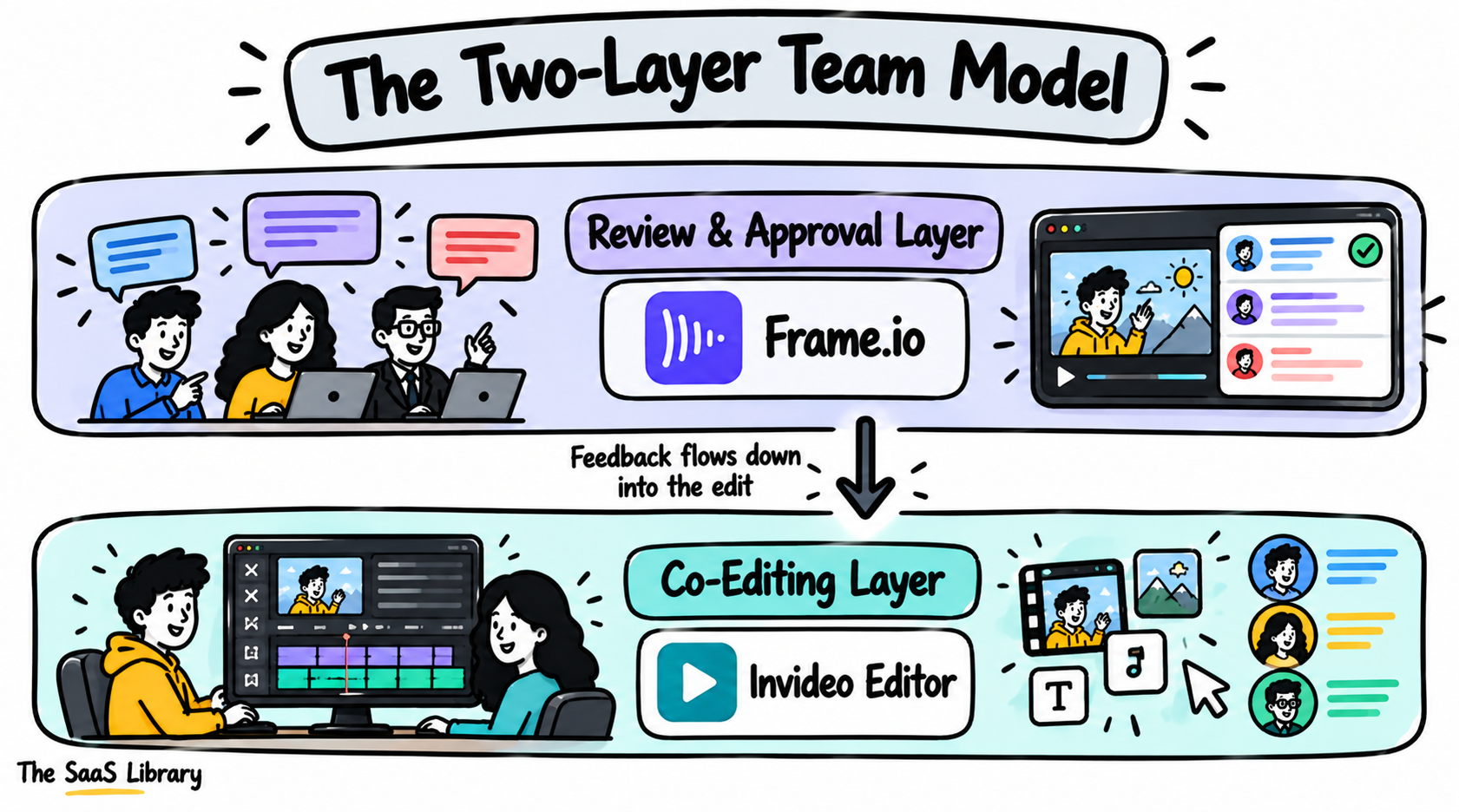
If you’re paying per seat for a reviewer who only needs to leave three comments a month, you’re paying co-editing-layer pricing for a review-layer job — that mismatch is where most teams overspend on collaboration tools.
Frequently Asked Questions
What is the best AI video editing tool for teams?
Invideo Editor is the best AI video editing tool for teams that want real-time collaborative editing without per-seat cost. Frame.io remains the stronger choice specifically for structured, frame-accurate review and approval.
How much does Frame.io cost per seat?
Frame.io’s Pro plan costs $15 per seat per month, and the Team plan costs $25 per seat per month. A free plan is available for up to 2 seats with 2GB of storage.
Can multiple people edit the same video project at once?
Yes — Invideo Editor lets a whole team work inside one shared project simultaneously, with no file locking, confirmed directly on its own product pages. DaVinci Resolve Studio also supports multi-user collaboration through Blackmagic Cloud project sharing.
Does DaVinci Resolve support team collaboration?
Yes, but only on the paid Studio tier. DaVinci Resolve Studio’s Blackmagic Cloud project sharing lets multiple editors or colorists work on the same project, for a one-time $295 cost. The free version is single-user only.
Is there a video editing tool for teams without per-seat pricing?
Invideo Editor’s manual timeline is free regardless of team size, with no per-seat cost. Assigning work to its AI agents runs on shared credit plans instead, starting at $17–20 per month.
Do I need Frame.io if I already have Premiere Pro?
Not necessarily, but the deepest structured review features in Premiere Pro’s workflow route through Frame.io’s native panel, which carries its own separate per-seat pricing on top of Premiere Pro’s $22.99/month.
Conclusion
Use the Two-Layer Team Model: identify whether your bottleneck is co-editing or review before picking a tool for either.
Invideo Editor covers both layers without a per-seat cost, since editors, collaborators, and AI agents share one project and feedback lands with real precision on the timeline itself. Frame.io remains the stronger, more established choice for structured review specifically, especially for a team already inside Adobe’s ecosystem, though its per-seat pricing is a real cost to plan around as a team or client list grows. Which combination fits depends on whether your team needs one integrated tool or is comfortable pairing an editor with a dedicated review layer.